What’s new
v0.443.0-beta · b9e6c91v0.443.0-beta
· b9e6c91- Affiliate partners get their own sign-in area and are covered by your two-factor policy.
- Partners must accept the current programme contract before they can use their area, and they are notified whenever their payout bank details change.
v0.442.0-beta
· 1619314- Leads from Klaviyo now land in an unassigned pool — each rep takes the ones they want with “Take it”.
- Lead pages show the person's real e-mail address, and your company's own phone number is no longer stored as a lead's phone.
- New on the Klaviyo card: delete what Klaviyo brought in and import it again cleanly — anything your team already worked on is kept.
v0.441.0-beta
· 9b465fd- Safety lock for the marketing product's test phase: leads and customers receive no e-mail at all — only your own team does.
v0.440.0-beta
· a77fbfd- Support messages now arrive as push notifications: admins are notified on their phone or browser when someone writes to support, and you are notified when support replies.
v0.439.0-beta
· d8067ef- Bug reports can now include a short replay of the last moments on screen, so the support team sees exactly what happened. Anything you typed and private fields are never recorded, and nothing is sent until you press Send.
v0.438.0-beta
· 7b75f8b- Klaviyo now brings in more than profiles: lists and segments with their members, e-mail engagement and order events, campaigns with their results, and flows — each with its own sync status on the integrations page.
v0.437.3-beta
· 95833ba- The sales CRM no longer shows the Skills screen — it only fed mentor and candidate matching.
v0.437.0-beta
· 6c0e973- Found a problem? The new feedback button in the bottom-right corner sends the support team a screenshot and the technical details of the page in one go — passwords and other sensitive values are removed first.
v0.436.4-beta
· 1cbf785- Erasing a lead now also removes that person's name, e-mail address and phone number from the account they were the contact of.
v0.435.0-beta
· 1a5e865- A paused pairing gets no reminders and does not count as active until it is resumed; its stage deadline picks up where it left off.
v0.434.0-beta
· ec105d5- Pairings can now be paused and resumed, and ending one asks why — an early end is no longer recorded as a completion.
v0.433.0-beta
· 543f0cf- You can now add and remove pipeline stages in the stage editor. A stage that still has candidates on it cannot be removed.
v0.432.0-beta
· 85f6f3a- Admins can now connect an HR export as a scheduled roster feed: map its columns from a sample file, preview a run, apply it, and see every row it changed.
v0.431.1-beta
· 3191662- Settings no longer run off the edge of a phone screen.
v0.430.0-beta
· 82166dc- A company that shortlisted a candidate can now ask to send them a message — the candidate's programme team reviews it first, and the candidate can close the conversation at any time.
v0.429.0-beta
· 6defb72- Single sign-on setup can now import your identity provider's metadata file or URL, warns 30 and 7 days before its certificate expires, and has a Test connection button.
v0.428.0-beta
· 53859ec- Candidates can apply to open roles from the Jobs page — answering the company's screening questions — follow their applications and withdraw them.
v0.427.0-beta
· 6392a89- Mentors and mentees now read and accept the mentoring agreement when their pairing starts, and admins can see and filter which pairings have signed — nothing is ever locked while it is unsigned.
v0.426.0-beta
· 9300378- Admins have a new Audit trail page: who impersonated whom, password resets, merges and decisions — with filters, and the IP and browser behind each impersonation.
v0.424.0-beta
· 6653d92- Integrations can now send up to 500 candidates in one API call; each one is checked for duplicates and reported back individually, with an optional dry run that changes nothing.
v0.421.0-beta
· e460969- New Matching rules page: decide which criteria count and how much, mark rules as required, and try a draft on your unmatched mentees before saving it — it shows who would match whom and which rule is too tight.
v0.419.0-beta
· f0d8253- Connect Klaviyo with a read-only key: every profile becomes a lead on your pipeline and stays in sync every 15 minutes — nothing is written back and no lead is e-mailed.
v0.418.2-beta
· b65ca8e- Paused mentorships are no longer flagged in relationship health, and the destination report never lets a small group be worked out from the totals.
v0.418.1-beta
· 15ac636- The skill vocabulary page now fits on a phone screen.
v0.418.0-beta
· 828e7c5- When a meeting is moved or cancelled, everyone invited — guests included — is told, with the old and new time or the reason. Anyone who cannot make a meeting can now suggest another time, and the organiser can accept it in one click.
v0.417.0-beta
· 1d0061d- Custom pipeline stages can be placed in a board phase, and “advance selected” now works on custom pipelines — and tells you which candidates did not move and why.
v0.415.0-beta
· ce09349- Mentees get a Jobs page: the open roles of the programme's companies, searchable by role, company, city, work mode and skill.
v0.414.0-beta
· 9751169- Integrations can now request a full export of a data set through the API and download it as a single file, through a link that expires on its own.
v0.413.0-beta
· 2e94241- Billing now shows which features your plan includes and which were granted on top, with the end date of any time-limited grant.
v0.412.0-beta
· 630346f- Document requirements can now require approval — by a mentor, the programme, the company or an external reviewer by e-mail link, in order — and can expire after a set number of days.
v0.409.0-beta
· d23b6d6- Programme admins can now write a mentoring agreement in English, Turkish and German — every change is saved as a new version, so what someone accepted never changes.
v0.408.0-beta
· 9e0176b- New SLA queue for administrators: every overdue stage in one list, with filters, bulk acknowledge and snooze — plus your stage SLA compliance rate, with exactly how it is counted.
v0.406.2-beta
· 64a3b54- Single sign-on pages and several screen-reader labels now appear in your language.
v0.406.0-beta
· ce42015- Admins can ask to move to another plan; operators apply or decline the request from a queue, and the plan changes immediately.
v0.405.0-beta
· 0896fe0- Each active mentorship now shows its health score, a 30-day trend and the reasons behind it wherever the pair is opened.
v0.404.0-beta
· 9424bee- Single sign-on now supports Single Logout: signing out of your identity provider signs you out here on every device, and signing out here also signs you out at your identity provider.
v0.400.0-beta
· 200d06d- Admins can now create a survey from a ready-made instrument and send it right away; questions that too few people answered stay hidden in the results.
v0.399.0-beta
· c741a8d- Reports can be sliced by your own attributes — department, location, tenure and more — on the new Reports screen and in scheduled reports. Groups under five people are always combined, and the totals still add up.
v0.398.0-beta
· 400304e- The executive dashboard now shows how many people in your pipeline reach the finish line by a date you choose, at your current conversion rate, and which stage needs more mentors. The arithmetic is shown.
v0.397.0-beta
· 9255259- Addresses that bounce or report our mail as spam are no longer mailed; admins can review and delist them under Settings → Email deliverability → Suppressions.
v0.396.0-beta
· df8c7c4- Invitation links now open a sign-up page in the inviting organization's own colours and logo.
v0.395.0-beta
· df4e543- Companies get a recruiting report: funnel, time to hire, time to fill, where candidates came from and a monthly trend for any period — with print, Excel export and, on Employer Plus, an anonymous benchmark.
v0.392.0-beta
· 56b70a2- Stage service levels can now escalate: if a stage is still overdue a set number of days after its deadline, your organisation's administrators are told too — once.
v0.390.0-beta
· ce43ba9- The analytics screen now draws real charts, including a new line that shows how conversion changes month by month over the period you pick.
v0.388.0-beta
· ee0f298- Admins can now see their own plan, this month's active pairs against the plan's band and the last twelve months under Billing.
v0.386.0-beta
· 0bd1ee6- Mentor suggestions now understand related skills — a mentee who knows React is also shown mentors with Frontend experience, ranked below an exact match and labelled as related.
- Open-position alerts for companies now match on the role's required skills and list which skills matched.
v0.385.0-beta
· e52225d- Automation platforms can now subscribe to events and unsubscribe again by themselves through the public API, and check a key without reading any data.
v0.384.1-beta
· 6c434e5- Searching mentors, candidates or the talent pool by skill now finds everyone who has it — no matter how long the list is — and the count is exact.
v0.384.0-beta
· 85bdadb- Attribute values can be imported from a CSV file, with a preview that shows unmatched and invalid rows before anything is written.
v0.383.0-beta
· 8658f66- Skill fields now suggest skills as you type — pick one with the arrow keys and Enter, so everyone's “React” is the same React. Anything not on the list can still be added.
v0.382.0-beta
· 1f8ba76- Mentors and mentees now see the programme journey on their pairing — what is due now, what comes next, and what is already done, with the same dates on both sides.
v0.381.0-beta
· 020b011- Other systems can now create and update candidates, move a relationship's stage and log interactions through the public API — with the same notifications and history as in the app.
v0.380.0-beta
· 912277b- Admins can define their own attributes — such as department, level, location or start date — in three languages, as the dimensions reports will be sliced by.
v0.379.1-beta
· ff9f700- Changes to an organization's settings now always appear in that organization's own audit log and audit stream.
v0.379.0-beta
· 5bbbce7- New hiring desk for programme admins: interview requests awaiting a decision, stalled applications, offers about to expire and open roles with no applicants — on one screen, each with a link to where you act.
v0.378.0-beta
· 061f320- Admins can now curate the skill list under Admin → Skills: fix labels in English, Turkish and German, add spellings, merge duplicates (with a preview of who is affected), retire skills and mark which skills are close neighbours.
v0.377.0-beta
· 2fa0d31- Programme owners can now lay out a journey step by step — a nudge on day 3, a first goal on day 7 — preview the dates for any pair, and publish it.
v0.375.0-beta
· 7edb1e0- A role's page is now an applicant board: one column per stage with live counts, filters by skill, city and name, moving one or several candidates at once, and a candidate preview without leaving the page.
v0.374.0-beta
· fe5e900- The public API now also reads relationships, interactions, meetings, companies, requisitions, offers and interview requests — each with its own permission, and interaction notes only with an extra one.
v0.373.1-beta
· c4cfb77- Opening a link to an older release note now reliably scrolls to that entry.
v0.371.0-beta
· aa3797b- The public API now pages through candidates with a cursor, can return only what changed since a given time, and answers every error with a stable, machine-readable type.
v0.369.0-beta
· 2e974b8- When a candidate accepts an offer, their application for that role is marked hired automatically.
v0.368.7-beta
· ca2149e- Signing in through your organisation's single sign-on, or being signed back in on a remembered device, no longer occasionally drops you on the sign-in page.
v0.368.4-beta
· 43de234- The sales product now speaks only in leads, sales reps, accounts and deals — no mentoring or internship wording is left on its screens, e-mails or notifications.
v0.368.3-beta
· 0526b5f- The setup checklist's help texts now speak in leads, sales reps and deals instead of mentoring terms.
v0.368.2-beta
· b7f9d8b- Document requirements show role names in your product's words (e.g. Lead, Sales rep) instead of internal codes.
v0.368.1-beta
· 590d631- Sales teams: records that only have a placeholder address never trigger an e-mail or a draft, the internship check-in mail is no longer sent to leads, and expired trials show the day they actually ended.
v0.368.0-beta
· 076fa85- Account events from the product you sell now cover cancellations and returning customers: a cancellation is filed as a lost deal with its reason, and a customer who comes back starts a new journey linked to the old one. History can be replayed in batches of up to 200 events, with a dry run that shows every outcome first and writes nothing.
v0.367.2-beta
· 2e25aab- Voice control now reaches the account menu and the site logo by the words you can actually see on them.
v0.367.0-beta
· 727eacb- New outbox for sales teams: switch on approval in Settings and automated mail to your leads and customers waits for you — preview each one, then send it now, schedule it or discard it.
v0.366.0-beta
· 4e2a4c9- Sales reps can now add a lead themselves: “New lead” on their dashboard puts it straight on their own board, with the same duplicate checks as the admin form and without e-mailing the contact.
v0.365.0-beta
· 6b628ad- Administrators who run the installation can now see the outgoing mail queue under Settings → Email deliverability → Queue: what is waiting, what could not be delivered, and whether the mail server is pausing. Undelivered mail can be retried and waiting mail cancelled.
v0.364.0-beta
· 4e5b22c- Large sends such as announcements, newsletters and bulk invitations are now paced instead of tripping the mail server. The confirmation tells you how many emails are queued and roughly how long delivery will take.
v0.363.0-beta
· f02aae5- Emails that a mail server temporarily refuses or delays are now queued and retried automatically instead of being lost, and sign-in and password-reset emails no longer keep you waiting when the mail server is slow.
v0.362.0-beta
· 6142144- A marketing site that has not set up its own brand now shows a neutral look — the coreCRM name, the standard blue and a simple app icon — and its pricing page invites you to ask for an offer instead of listing figures.
v0.361.0-beta
· d8cc6e1- Sales organizations can set how long the decision window after a trial lasts, and can save their own default letter for postal campaigns.
v0.360.0-beta
· e972729- Organizations can upload their logo mark and get a complete set of app icons generated from it — home-screen and maskable icons, favicon, shortcut icons and iOS launch screens — plus a tile colour, a default accent and, optionally, their own colour palette that members can pick as "Organization colour".
v0.359.0-beta
· 0b36dcd- Admins can now require two-factor authentication for everyone, and see per role who has enrolled — with a list of the accounts that have not, downloadable as CSV. Switching to a stricter policy shows how many people it will affect and asks you to confirm first.
v0.358.0-beta
· 332e82c- The Android app now notifies you of new messages even when it is closed. Tap the notification to open the conversation — in the right product, if you use both. Signing out of one product stops its notifications only, and you can see and revoke the app under Account settings → Devices receiving push notifications.
v0.357.0-beta
· 5996a71- The account import takes the day a customer’s contract ends, so customers who already gave notice arrive with their notice period.
v0.356.0-beta
· 5996a71- A week before an expired trial’s decision window closes, it shows up in your attention queue with the date, and you get one reminder.
v0.355.0-beta
· 623af3d- Interview panels now produce a decision: once the scorecards are in and the panel is closed, record whether the candidate advances, goes to offer or is not selected (with a reason). The company sees the decision only, never the scores. Scheduling an interview can convene the scorecard panel at the same time.
v0.354.0-beta
· bb5e741- You now get an e-mail (and an in-app notice) when your account is signed in to from a new browser, when your password or e-mail address changes, when two-factor authentication is turned on or off, when your recovery codes are replaced, or when every device is signed out — even if you have switched all other notifications off.
v0.353.0-beta
· 4c4ccd9- Minutes you write for a session now become that meeting's entry in the interaction history, replacing the automatic one-liner. Any line that starts with "- [ ]" is an action item: tick it in the minutes or turn it into a to-do for either of you — the two stay in step.
v0.352.0-beta
· 30b913d- Teams that live in Slack can meet in a huddle: paste a channel's huddle link as your personal room or into a meeting, and the app recognises it — the meeting panel offers “Open in Slack Huddle” and the hint under the link box says where it opens. Only workspace members can join a huddle, so keep a built-in room for mentees and guests outside Slack.
v0.351.0-beta
· 2fc299e- Admins can now switch AI off for the whole organisation in one click, or turn single features off (for example CV parsing) while keeping others on, and give a feature its own monthly allowance. People see "AI is turned off" rather than a quota message when that is the reason.
v0.350.0-beta
· 0ccbc28- Interview requests can now be scheduled in the app: pick one of the company's proposed times (or another one), name the time zone, invite the company's interviewers by e-mail, and everyone sees the confirmed time on their own clock. A scheduled interview can be cancelled with a reason, which also removes it from the calendars.
v0.348.0-beta
· 523546a- Organizations can now set their own password rules — minimum length, upper/lower case, digit, symbol — and the sign-up, reset and account forms show and check exactly those rules as you type. New passwords are also screened against known data breaches (Have I Been Pwned, privacy-preserving: only a five-character fingerprint leaves the server), and an outage of that service never blocks you.
v0.347.0-beta
· a7421ab- Safeguarding for programme admins: private messages that share a phone number or an e-mail address, or use one of your watch keywords, appear in a review queue — without ever being blocked.
- Programmes can now choose how long message text is kept; older text is removed every night and the conversation stays intact.
v0.346.0-beta
· 5eda233- Session agendas can now be personalised with AI: one click proposes agenda lines adapted to the pair's open goals, the previous session and the latest notes. The proposal is a draft until you add it, and when AI is not available the guide is shown as written — never a paywall.
v0.345.0-beta
· 52e76df- After a session, either of you can write the minutes — what was said and agreed — and both of you read and edit the same text. Every save keeps a version with who saved it. Your private notes stay private; this is a new, shared record beside them.
v0.343.0-beta
· e8cc39b- The admin AI tools — the match rationale, survey summaries, open-text insights and the analytics narrative — are now part of the AI pack. Everything a mentee or mentor uses for themselves stays free, and organisations that already had the tools keep them.
v0.342.0-beta
· b3cc5de- Procurement can now open our accessibility conformance report (VPAT 2.5): WCAG 2.2, EN 301 549 and Section 508, criterion by criterion, each row with the test or file behind it — from the accessibility statement and the trust page, no sign-in needed.
v0.341.0-beta
· b382502- Administrators can now manage the library of session guides under Session guides: write a conversation once in English, Turkish and German, with its prompts and a note for the mentor, reword it later and every session that used it follows, or retire it without touching sessions already held.
v0.340.0-beta
· cb89bd8- Stream your audit trail to your own SIEM: register a receiver under Integrations and every audit event — impersonation, password resets, account merges, cancellations — arrives as signed, newline-delimited JSON (or Elastic Common Schema). An outage is replayed from the last delivered row, never lost; a test button sends two synthetic rows so you can prove the signature first.
v0.339.0-beta
· 79ecf1e- Practise a job interview for your target role by typing your answers, then get a private report on what went well and the two things to work on next — share it with your mentor if you like.
v0.338.0-beta
· 2abffa3- Every mentoring session can now have an agenda: pick one of the guided conversations or start an empty list, tick the points off together during the call — both of you see the same list update live — and carry whatever was not finished into the next session.
v0.337.0-beta
· fe970ff- Offers can now carry structured pay — currency, base amount and period, hours, contract type, bonuses — next to the free-text note. Candidates see it on their offer card; admins get a compensation benchmark on the Offers page (median and quartiles per position, hidden for fewer than five offers).
v0.336.0-beta
· a017f90- The follow-up field on a mentee's record now speaks your language: an internship example instead of a sales one, a line that says who sees the note (you and the admins — never the mentee), ready-made next steps for the current stage you can click into the field, and a one-click AI suggestion based on the interaction log.
v0.335.0-beta
· 83a46e0- When someone unsubscribes, every bulk email they no longer receive is now on record — and admins can look up an address to show that the opt-out was respected.
v0.334.0-beta
· e0dc89e- Turn a one-line brief into an announcement or template in all three languages, and let mentors fill their profile from a pasted career summary — every suggestion is yours to accept or skip, and nothing is sent or saved without you.
v0.333.0-beta
· 0178cb5- Write an announcement or template in one language and fill the other two with one click. Machine translations are marked until you review them, and a translation you wrote yourself is never overwritten.
v0.332.0-beta
· 9d6db5c- CV feedback is now a score out of 100 with a checklist of what to fix, section by section — and it can be tailored to a role a company is considering you for. Re-review after an update and see how much you improved.
v0.331.0-beta
· b0e81ca- API keys can now have a daily or monthly request allowance, each key gets its own per-minute budget, and every API response tells the integration how many requests it has left.
v0.330.0-beta
· c9068dd- Admins get an AI usage screen: calls, failures and spend per AI feature for this and last month, the monthly AI budget you can change in place, and whether the AI provider is connected.
v0.329.0-beta
· 260935e- AI features are harder to manipulate: text you upload or write is always treated as data, contact details are removed before anything is sent where they are not needed, and AI answers are always shown as plain text.
v0.328.0-beta
· fe81b17- Mentors can get an AI draft for a first message, a check-in to a quiet mentee or an outcome note — written in the mentee's language, based only on what the relation shows, and never sent until you press Send.
v0.327.0-beta
· 8770914- Creating an organization is now a guided five-step setup: name and address, plan, branding, starter pack, and an invitation for its first administrator, all created in one go.
v0.326.0-beta
· 98161d3- Catch up on a long conversation in a few lines, and get a suggested reply in three tones that you can edit before you send it. Nothing is ever sent for you.
v0.325.0-beta
· 56b0a4b- Sign in without a password: choose "Email me a sign-in link" on the sign-in page and we send you a link that works once and expires in 15 minutes. If you use an authenticator app, it still asks for your code.
v0.324.0-beta
· 0c0f9ff- A goal can now say how you will know it is achieved, carry a target date next to its deadline, show a progress bar, and be shared with the pair, with the programme, or kept private to you — a private goal is invisible to everyone else, including administrators.
v0.323.0-beta
- A lost customer who comes back starts a new journey with one click — a new trial or signed straight away — and the return counts as a new win.
v0.322.0-beta
- New sales workspaces follow a trial-led journey: no proposal or negotiation stage — a deal is won straight out of the trial’s decision window.
v0.321.0-beta
- When a customer gives notice, record the day their contract ends: they stay a won customer, show up in your attention queue for the whole notice period, and you get a reminder on the last day.
v0.320.0-beta
· d4277a2- Once product usage flows in, accounts whose usage drops and trials nobody has started using show up in your attention queue, and each account page charts its last 90 days.
v0.319.0-beta
· 5526b44- Meet in the tool your organization already uses: save your personal Zoom, Meet or Teams room on the account page, and an organization can ask that meetings always use its own conferencing tool. A pasted link still wins, and when a link cannot be shown inside the app the panel now says where it opens.
v0.318.0-beta
· d293ec4- Groundwork for session agendas: the data model and a six-conversation starter library (kickoff, goal-setting, mid-point review, career, feedback, closing) in English, Turkish and German. The agenda panel itself follows.
v0.317.0-beta
· 4d93914- AI calls now record which model answered, the tokens used and what they cost, so an operator can answer "what did AI cost us last month" — and route each task to a different model from the environment, without a deploy.
v0.316.1-beta
· 14569e3- The SSO role mapping now uses your product's own role names and offers only the roles your product has.
v0.316.0-beta
· d7d0121- Pin important conversations to the top of your inbox, archive the ones you are done with, and mute a conversation for 8 hours, a week or until you turn it back on. Filter your inbox by Unread, Pinned or Archived.
v0.315.0-beta
· f419bba- Admins who also work leads can narrow the account list to “My accounts”.
v0.314.0-beta
· fe0fb74- Forward a customer’s reply to your CRM address and it is logged on their account as an incoming contact — with the original date and subject, never the content.
v0.313.0-beta
· 887266c- Long conversations open instantly: you see the newest messages first, and older ones load as you scroll up.
- Search your messages from the inbox. A result opens the conversation at that exact message.
v0.312.0-beta
· 84573b8- New Migrate a programme page: upload your old platform's export, check the proposed column and stage mapping, preview every row, then migrate — nobody is e-mailed.
v0.311.0-beta
· 7234123- The starter pack can also add a labelled sample programme so a new organization's screens are not empty on day one — and remove it again in one click.
v0.310.0-beta
· 3671a05- Moving from another platform mid-programme: people, pairs, their stage history and session notes can now be migrated in one rehearsable run — with nothing e-mailed until you decide to invite.
v0.309.0-beta
· a998c74- New organizations can start from a ready-made setup: stages, service levels, required documents, an evaluation framework and goal templates in one click from Settings — and applying it again never changes what you edited.
v0.308.0-beta
· 7ecbb0d- Importing people from a spreadsheet now reads exports from German or Turkish Excel (with ; as the separator) and shows each row's result — and why — in a clearer table, before and after the import.
v0.307.0-beta
· 3fe9f7d- Relationship health now marks pairs whose evaluation comments or weekly-report blockers fall into a negative theme on the Insights page — as a note to read, without changing the score.
v0.306.0-beta
· b15ed95- Times now read the quick way: "5 min. ago", "8 days ago" instead of a full date — on the release notes and across messages, notifications, activity and lists. Hover to see the exact date and time.
v0.305.0-beta
· 04029f9- The AI summary of a survey question now shows how many answers each theme stands for and opens them on click.
- The analytics page can write a short “what changed” paragraph from its own figures — and throws it away if it cites a number that is not on the page.
v0.304.0-beta
· 90fe1df- The product tour on the home page now shows the screens in your language.
v0.303.0-beta
· 90b43b5- Put your organisation’s CRM address in BCC when you e-mail a customer, and the contact is logged on their account automatically — date, subject and recipients only, never the content.
v0.302.0-beta
· 88eaefe- New Insights page for admins: see the recurring themes in evaluation comments and weekly-report blockers, open the rows behind every theme, and see who has not handed in last week's report.
v0.301.0-beta
· 2fb1227- The AI summary of your interaction log is kept: it is there when you come back, and asking again for an unchanged log costs nothing.
v0.300.0-beta
· 5c2cc02- If your Google Calendar is connected, bookings now respect the times it shows as busy. Only the busy times are read, never what they are.
v0.299.0-beta
· c994356- Your CV feedback and interview prep are now kept: they are still there after a reload, asking the same question again answers from the saved copy at no cost, and you can choose to share a result with your mentor.
v0.298.0-beta
· 60511d7- When you schedule or request a meeting, Suggested times now offers slots that suit both of you, within working hours on each person's clock. One tap fills in the form.
v0.297.0-beta
· 6bad6da- Mentors can set booking rules on their Availability page: minimum notice, a break between meetings, a weekly or monthly limit and a session length. When a request is refused, mentees see which rule applied.
v0.296.0-beta
· 832171c- New First destination screen in Analytics: where participants ended up, with the share you actually know about, by cohort and source. It prints as a one-page report and is included in the Excel export.
v0.295.0-beta
· 4ce414d- You can now edit an availability slot in place, offer a one-off time on a specific date, and mark days you're away: none of your hours are offered then, and your weekly pattern stays as it is.
v0.294.0-beta
· 2f4ebfa- Programmes can now ask participants where they ended up, 30, 90 or 180 days after the programme, and see the answers by cohort and source, always alongside how many people actually answered.
v0.293.0-beta
· e4e934e- Saved views now follow you to any device and can be shared with your team — and you can save them on the board, mentors, companies and users lists too.
v0.292.0-beta
· d175cd3- Nobody gets double-booked any more: a meeting can't be scheduled, moved or requested into an hour that's already taken, and you see what's in the way. Booked hours no longer appear among the times you can request.
v0.291.1-beta
· 4adef55- When the AI service has a hiccup, AI features now retry quietly and, if it is still down, say "temporarily unavailable" instead of failing — and a failed attempt never counts against your monthly allowance.
v0.291.0-beta
· 1c9852d- When you end a meeting, you can now note who was there in one tap — and each mentorship shows whether the pair meets on the rhythm you agreed.
v0.290.0-beta
· 274c66b- The programme health card now also shows evaluation coverage — how many of the evaluations that fell due were actually written.
v0.289.1-beta
· 2a0bf92- In dark mode, links stay readable when you hover them: the footer's release-notes link, your mentor's e-mail address and the back button in Messages.
v0.289.0-beta
· 7c84bbe- Survey campaigns can now repeat: send a short pulse every week or month, and everyone gets one invitation per round.
v0.288.0-beta
· d4894ae- Analytics now shows whether your pairs actually meet: who met in the last 30 days, who keeps the agreed rhythm, and the no-show rate — counted from real meetings, never predicted.
v0.287.0-beta
· 0cb71a1- The programme health card now shows your Net Promoter Score and survey response rate, and your surveys appear in the printable report and the Excel export.
v0.286.0-beta
· f99866c- Mentors are now reminded when an interim or final evaluation is due — on the day and once more a week later — and the reminders stop the moment it is written. Set when each one falls due in Settings.
v0.285.0-beta
· 0a64a5f- Too many written answers to read? Summarise them with AI into themes, with quotes taken word for word from the answers — and nobody is ever named.
v0.284.2-beta
· a3ad16d- The Marketing CRM no longer records internal pipeline-stage changes as notifications on a lead's own account.
v0.284.0-beta
· 02ddd7a- The estimated deal value now shows the net change per month and comes along in both Excel exports and the printable report.
v0.283.0-beta
· e710446- Surveys now remind people who have not answered — twice at most — and a new completion screen shows who still owes an answer, with a "remind now" button. Anonymous surveys show only the numbers.
v0.282.1-beta
· 46098da- Going back from a conversation twice in a row no longer shows an error screen.
v0.282.0-beta
· 4c78444- Survey results are here: see your programme's Net Promoter Score, how it moves week by week and how each question was answered — with groups smaller than five never shown.
v0.281.0-beta
- The Marketing CRM now has a published price list: three plans for sales teams, billed per user, on the pricing page.
v0.280.0-beta
· ca8c947- Surveys can now go out on their own: when someone reaches a stage, a set number of days after they start or before a deadline, or once to everyone — each person invited once, and anyone who turned survey e-mails off is left alone.
v0.279.1-beta
· fdc551e- In dark mode, the missing-field links on your profile stay readable when you hover them.
v0.279.0-beta
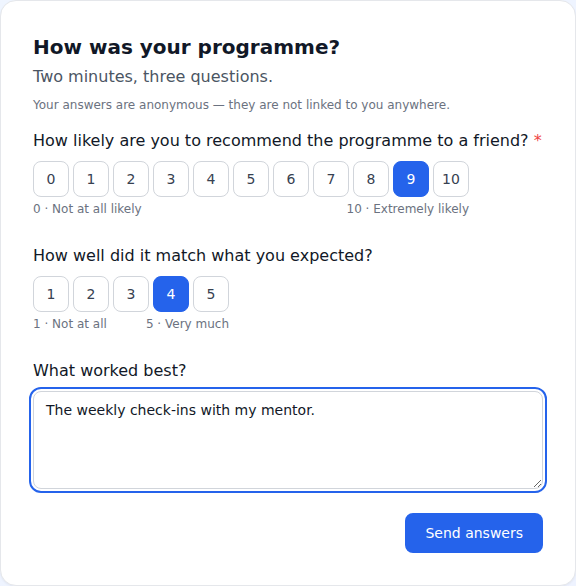
· 020937a- Surveys can now be answered straight from the e-mail link — no login, one question per screen on a phone, and a link that works once.
v0.278.0-beta
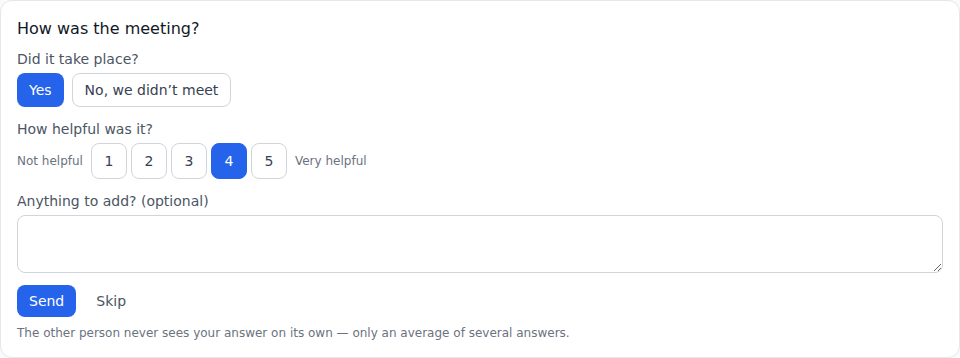
· 4d85cc7- After a meeting you can now say in one tap whether it happened and how helpful it was — in the app right after ending it, or from a single e-mail without logging in. The other person only ever sees an average of several answers.
v0.276.0-beta
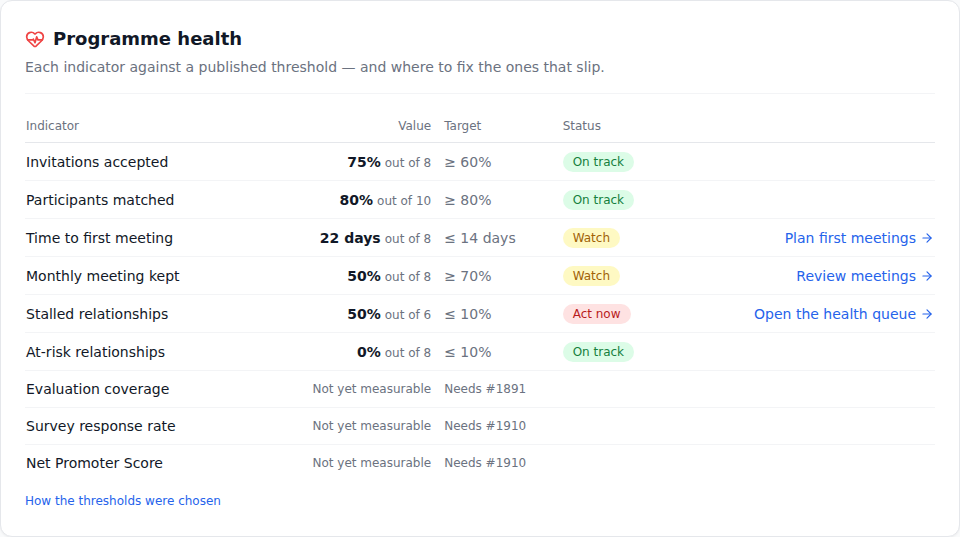
· 5fccf6b- Analytics now opens with a Programme health card: each indicator measured against a published target, marked on track, watch or act now — with a link straight to the screen where a slipping one is fixed.
v0.275.0-beta
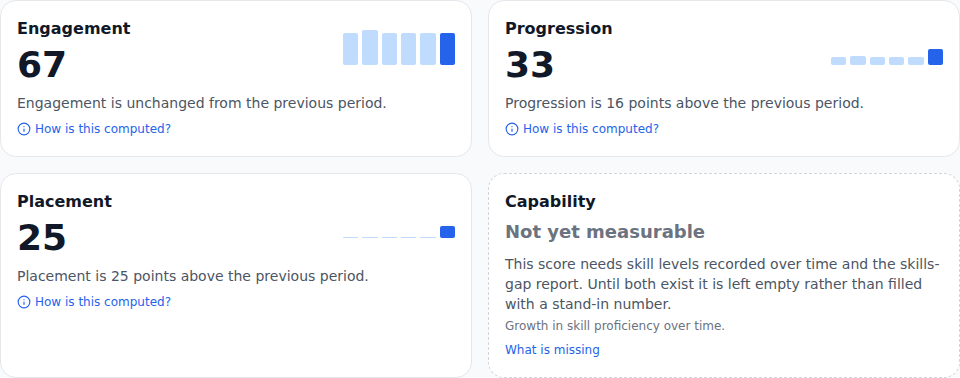
· 68f9676- New Executive dashboard for admins: Engagement, Progression and Placement as scores from 0 to 100, each with its trend and the exact arithmetic behind it — ready to print on one page for sponsors.
v0.274.0-beta
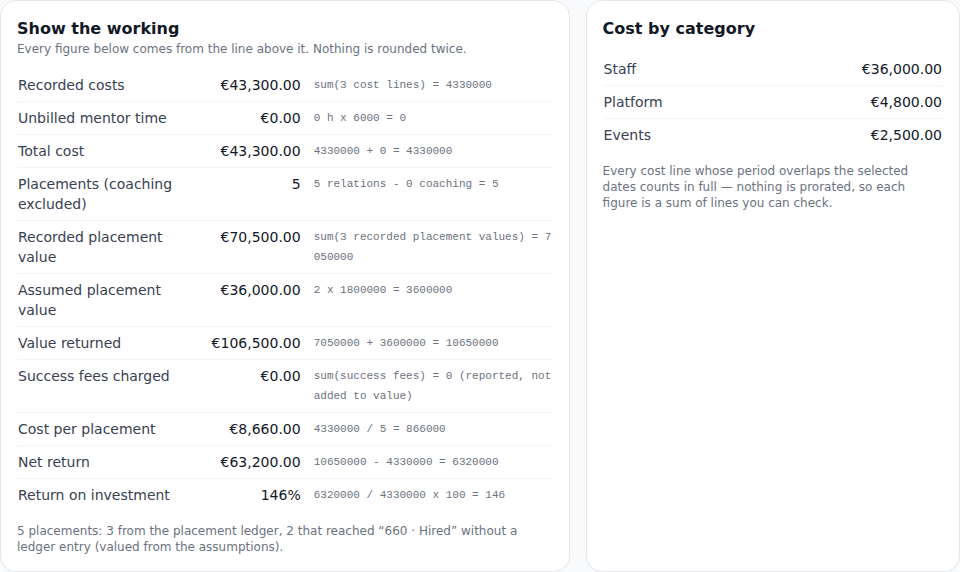
· 8bd0882- New Programme ROI report for admins: what the programme cost, what it returned and every step of the calculation in between — with the assumptions on screen to adjust, and a one-page printout for sponsors.
v0.273.0-beta
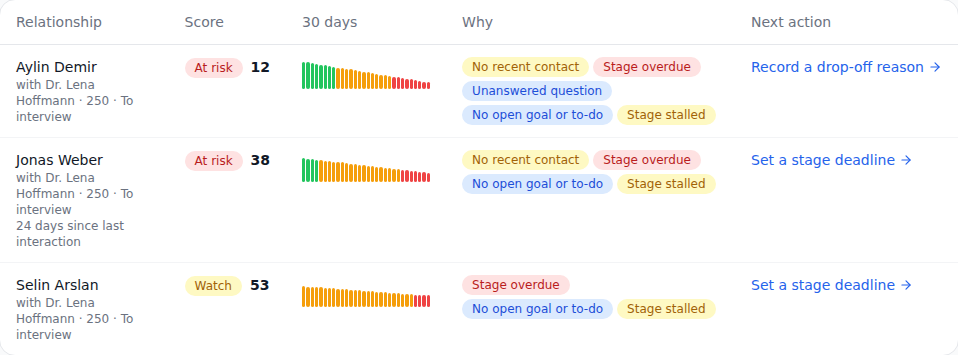
· 974ab70- New Relationship health screen for admins: every active mentoring relationship, worst first, with the reasons it is slipping and one click to the fix — message the mentor, reassign, set a stage deadline or record why it ended.
v0.272.0-beta
· 69965e7- Admins now get one short e-mail when a mentoring relationship turns at-risk — with the reasons, such as how long the pair has been out of touch — instead of having to check every relationship themselves.
v0.270.0-beta
- The public API and webhooks are now part of Program Plus and Enterprise. Organisations already using them keep them; taking an integration down always works.
v0.269.0-beta
· e73fa63- The weekly analytics e-mail is now a scheduled report you can manage: every admin who received it keeps it, in their own language, and can change the day, the format or unsubscribe on the Scheduled reports page.
v0.268.0-beta
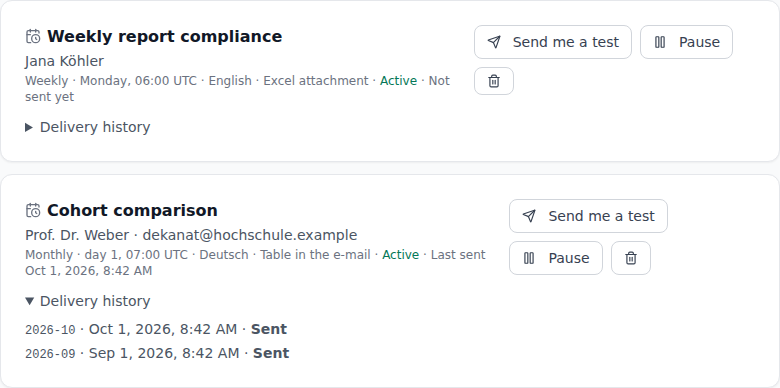
· 9a04c47- Scheduled reports: send any report weekly, monthly or quarterly to someone on your team or to an outside stakeholder — a dean, a sponsor, a funder — in their language, as a table in the e-mail or as an Excel/CSV file. Recipients without an account can unsubscribe with one click.
v0.266.1-beta
· d807488- Bulk CSV import: a row that cannot be saved (for example an over-long name) is now listed with its reason instead of stopping the whole import, the test run promises exactly what the real run creates, and large files import much faster.
v0.266.0-beta
- The Marketing CRM home page now shows the product in action: the pipeline board, a rep's dashboard and the funnel analytics.
- On a phone, a long workspace name no longer covers the buttons in the top bar.
v0.265.0-beta
· 933a31b- Exported analytics reports now combine groups of fewer than 5 people into one row, so no individual can be singled out — the totals still add up, and the analytics page notes it.
v0.262.0-beta
· 910ef31- Accounts now show which marketplaces, shop systems and carriers a merchant uses — from the import or set by hand — and a postal campaign can target, say, every OTTO seller.
v0.260.1-beta
· 5c8d236- A new public page explains how to delete your account, what is deleted and what stays — linked from the privacy policy.
v0.260.0-beta
- The home page's product tour now shows each screen in action, in a clean browser or phone frame.
- In dark mode the Marketing CRM home page keeps its own accent colour.
v0.258.0-beta
· d1bf531- Accounts can now hold several contacts. Mark one as the primary contact, edit or remove the others, or move a person to another account when they change jobs.
v0.257.3-beta
· b444b55- The weekly analytics report e-mail now arrives in your own language, stage names included.
v0.257.2-beta
· 8c18f41- The sales leaderboard now always lists your admins too, not only in months they close a deal.
v0.257.1-beta
· b58d452- The site footer is simpler: the “Built and maintained by” line is gone.
v0.256.1-beta
· b815803- Notifications about a lead changing stage now name the stages in your own language.
v0.256.0-beta
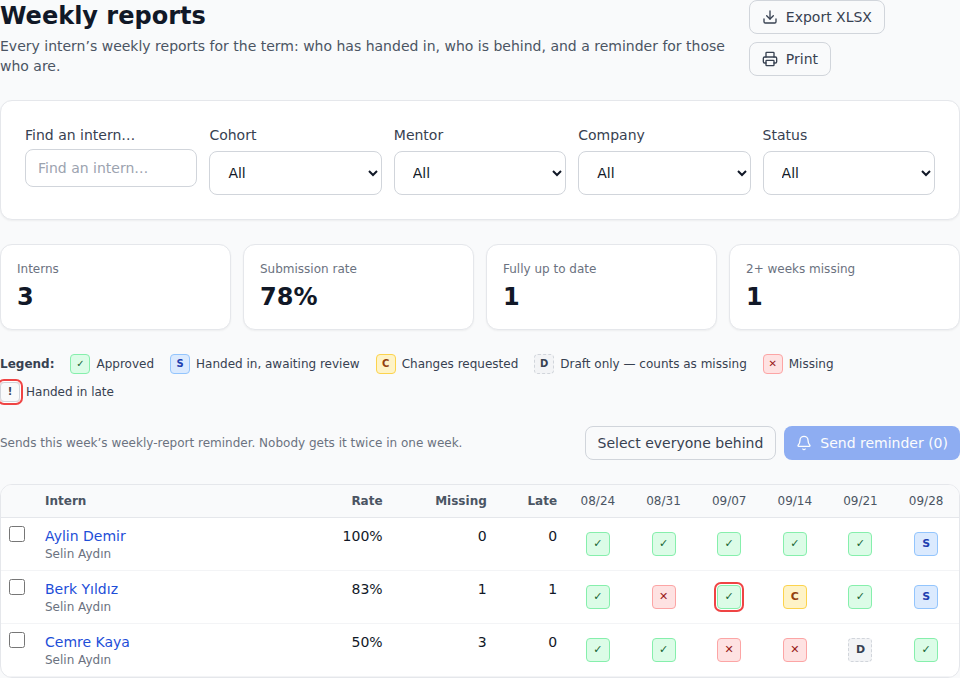
· 6ecf029- Coordinators get a new Weekly reports screen: every intern’s weekly reports for the term in one matrix, a reminder for those who are behind (never sent twice in a week), an Excel export and a printable report booklet per intern.
v0.254.1-beta
· 783d663- Sales pipeline stages now appear in your own language instead of always in English.
v0.254.0-beta
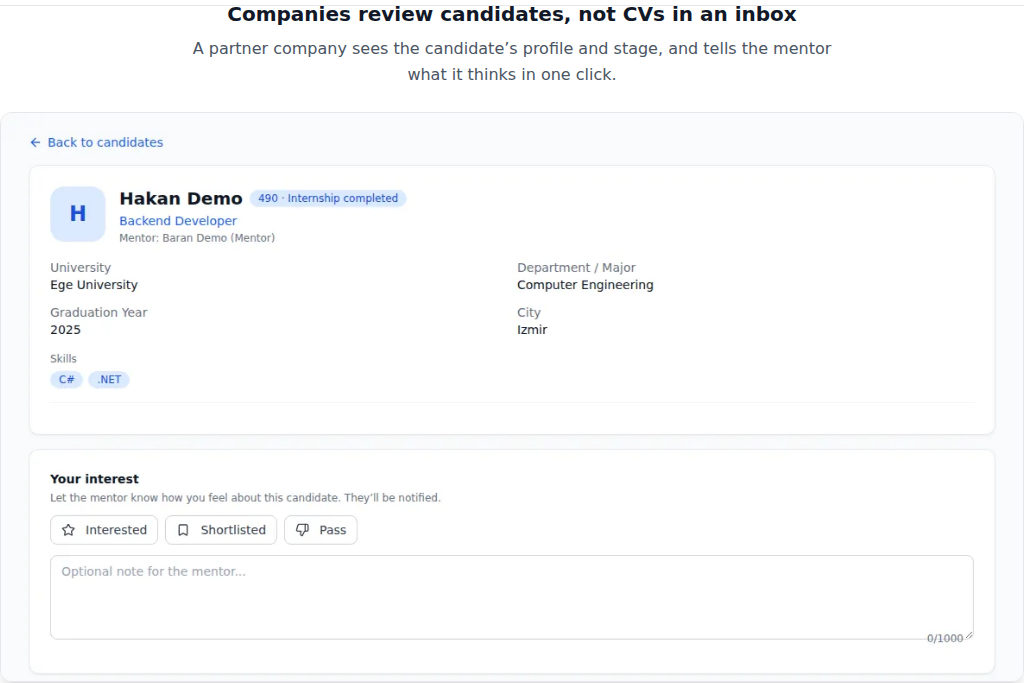
· ca1d338- The home page now shows the product itself: three real screens — what a mentee sees of their journey, the mentor’s board and a company’s candidate view — in your theme and sized for your device.
v0.253.0-beta
- Sales teams can set a monthly target for won deals: every rep sees how many they have won this month against it, with a progress bar. Admins can also switch on a team leaderboard for reps — names and counts only.
v0.252.0-beta
- Your portal now shows how complete your profile is, with a short list of the fields that are still empty — each one takes you straight to the field. The fuller your profile, the more matching and the people reviewing it have to work with.
v0.251.0-beta
- Your completion certificate is now in your portal: download the PDF or add it to your LinkedIn profile in one click, with the name, issuer and date already filled in.
v0.250.0-beta
- Mentors now see a private summary of their own impact on the dashboard: how many people they have guided, how many they guide now, and how many reached an internship or a hire. Only you see it — no points, no rankings, no comparisons.
v0.249.0-beta
- Postal campaigns: win new customers by letter — the one cold channel German law allows. Pick accounts, print letters with the privacy notice on the back, and see every demo request that came through the letter’s link.
- Record an advertising objection on an account: every channel is blocked for good, even if the account is later deleted.
v0.248.0-beta
· db2deba- A simpler home page: one idea per section, pick your side in one tap.
v0.247.0-beta
· e581efa- The public site now has its own address in each language — for example /tr for Turkish and /de for German. A link you share opens in the language you sent it in, and switching language keeps you on the same page.
v0.246.0-beta
· 9b3b00e- The "What's new" page now opens much faster: it shows the latest 20 releases and loads older ones when you tap "Load more".
v0.245.0-beta
· 22f7cda- The Marketing CRM home page now answers the most common questions in an FAQ, and every public page tells search engines and AI assistants its one true address.
v0.244.8-beta
· 9a2db9c- Each organization's monthly AI allowance now counts only its own AI calls. Another organization's usage no longer uses up yours.
v0.244.7-beta
· 16cc084- The data-retention page now shows only your own organization's candidates and applicants.
v0.244.6-beta
· 1ae5157- Settings saved by an administrator now apply only to their own organisation.
v0.244.5-beta
- Everything you do in the Marketing CRM now stays in the Marketing CRM (and the same for Internship CRM): password-reset and verification e-mails, notifications, reminders, calendar entries and links always come from the product you are using.
v0.244.3-beta
· 8a31aeb- The weekly analytics email now follows your own organization's premium analytics setting.
v0.244.2-beta
· 62753e7- In the marketing product, admins switch between the admin view and their own sales view; the mentor view and the project field on invites are gone there.
v0.244.0-beta
· cc63dfb- Sharing a page on LinkedIn, WhatsApp, Slack or X now shows a proper preview card with the page's title and a short description, instead of a bare link.
v0.243.3-beta
· 5dfde9d- Every public page now has its own title in your browser tab and in search results — in English, Turkish or German, matching the language you read it in.
v0.243.2-beta
· 6d05bff- Better contrast in the mentee portal: the mentor and company labels, the RSVP buttons in dark mode and the filter pills on your notes are now easier to read.
v0.243.1-beta
· 397ba8f- Creating or editing a project in the portal now keeps the form open until the updated list is shown, instead of briefly showing the old list.
v0.243.0-beta
· e655f9a- You can now turn a 1:1 into a recurring meeting — every week or every few weeks, open-ended, until a date or for a set number of meetings. Both of you get it on your calendar, with reminders the day before and an hour before.
v0.241.1-beta
· 968bf90- Calendar: screen readers now announce each day's full date and its events, and the view buttons say which one is active.
v0.241.0-beta
· e0e2fb5- A project's weekly meeting now appears in each member's connected Google Calendar as one recurring event — and moves or disappears with it.
v0.240.0-beta
· 506f1d6- New setting: when an offer is accepted, the record can move to the hired stage by itself — with the usual stage history and notifications. Off by default.
v0.239.0-beta
· 6170e36- Enterprise SSO: map a group from your identity provider to a role, so mentors and company contacts land in the right place on their first sign-in.
v0.238.0-beta
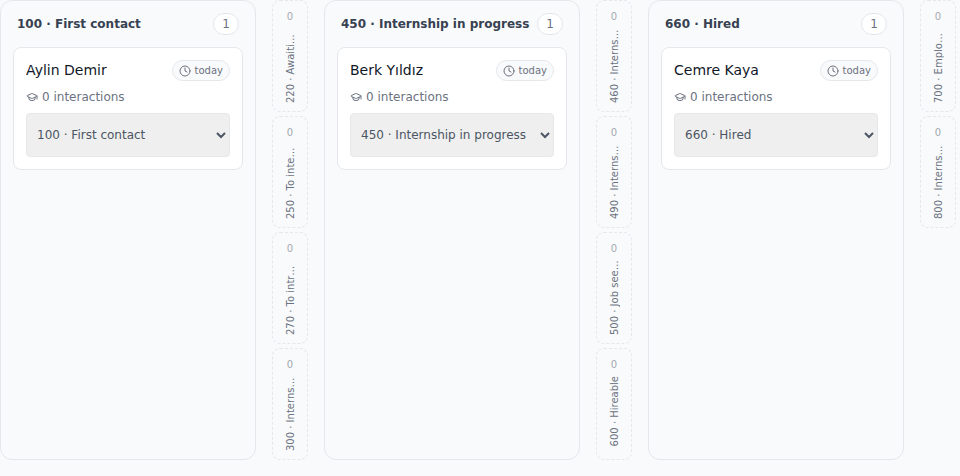
· 7d3e89e- The board now opens on your own people: empty stages fold into a slim strip (you can still drop cards onto them), so everyone in three different stages is visible at once. "Show empty stages" brings the full width back.
v0.237.2-beta
· 741ef1c- The site now opens in your browser's language (English, Turkish or German) on your first visit — no need to find the language switch first.
v0.237.1-beta
· a2280ab- If a mentor page cannot load its data, it now says so and offers a retry, instead of showing "Loading…" forever.
v0.237.0-beta
· b7d2020- Meetings now have a length you choose (15–90 minutes) — and it is the same everywhere: in the app, in the calendar file you download or subscribe to, and in your Google Calendar. Downloaded meetings no longer end half an hour early.
v0.236.0-beta
· 88ddfb2- When a candidate accepts an offer, its requisition's filled count goes up by itself — and the requisition closes as filled when the last seat is taken.
v0.235.0-beta
· c4e6136- Each product now has its own super admin: the internship and the marketing operator see and manage only their own product's organizations, and a new organization is always created with its product chosen explicitly. Internship-only screens — the newsletter, e-mail to mentees, re-engagement, testimonials — no longer open for a marketing organization, not even by typing their address.
v0.234.12-beta
· c4e6136- Each organization now sees only its own mentorships, meetings and calendar entries.
v0.234.11-beta
· c4e6136- Admin notifications and summary e-mails now only ever cover your own organization.
v0.234.10-beta
· c4e6136- Each organization now sees only its own activity log, support tickets and templates.
v0.234.7-beta
· 93b8d35- If you connected Google Calendar, meetings accepted from a request now appear there too, and meetings that are removed disappear from it.
v0.234.6-beta
· 1be0906- On a customised pipeline, the cohorts page now counts hires correctly, and a placed candidate is no longer shown as past their stage deadline.
v0.234.5-beta
· 0b236a6- On a customised pipeline, mentors no longer get deadline reminders for candidates on a final stage, and the weekly analytics mail shows your own organisation's figures and stage names.
v0.234.4-beta
· f4bbddb- The duplicate-candidates page opens much faster on large candidate lists and shows 25 pairs at a time.
v0.234.1-beta
· cf3ffe9- Deleting or anonymising an account now also removes the person's evaluations, weekly reports, questions, goals, offer and interview notes, and their notifications.
v0.234.0-beta
- The analytics page has a new Trial → paid card for sales pipelines with a trial stage: of the trials that started in a month, how many became paying customers — and, on the premium tier, the same rate by lead source.
- A month shows a dash until every trial started in it has ended, because a trial that is still running has not had its chance to convert yet. Handing an account over to a new owner now counts as one customer, not two, in the funnel conversion, cohort, retention and trial reports.
v0.233.0-beta
- Super admins can now invite the first administrator of any organization straight from the Organizations screen — including from a phone: the registration link appears with Copy and Share buttons, and the invitation is emailed too.
v0.232.1-beta
- For a marketing organisation, the invite, users, analytics, settings and account screens — and the invitation, assignment and reminder e-mails — now talk about leads and sales reps instead of mentees and mentors.
v0.231.0-beta
- Marketing organisations can import their customer table themselves: Settings → import → "Marketing accounts". Preview the file first — nothing is written — then apply it; running the same file again changes nothing.
- Imported accounts can carry their product id and their trial and customer-since dates, so imported trials get their reminders like any other.
v0.230.0-beta
- Leads from the website demo form, the account import and the manual lead form are now attributed to a source automatically — the campaign they came from, or the source you typed — so the source report on the analytics page counts them. Leads with no known source are listed separately.
- Two organisations can now each have a source with the same name, such as "Google Ads".
v0.229.1-beta
- Signing in with your company's SSO, or connecting Google Calendar, from the Marketing CRM now brings you back to it — and the unsubscribe and preference links in its e-mails open it too.
v0.229.0-beta
- Sales records can now carry an estimated monthly value, and the analytics page shows month by month what was won, what was lost and the estimated monthly value of the accounts you hold.
v0.228.0-beta
- Every account now shows on what basis you may contact it — a confirmed double opt-in, a §7(3) existing-customer record with its reason, or only a reply to their own request — with the proof, and a warning when there is no provable e-mail permission. The product-news box on the demo form sends one confirmation e-mail and only counts once the person clicks it; imports never create a permission. The company list can be filtered to the accounts you may actually e-mail.
v0.227.4-beta
· ef6e884- Message notification e-mails no longer invite you to reply by e-mail when replies can't be received; they point you to the app instead.
v0.227.3-beta
· 3e1fef4- The e-mail delivery log in the settings is now shown only to the platform operator. Workspace admins no longer see mail sent to other workspaces.
v0.227.2-beta
· d58f31c- On a marketing workspace, the privacy settings on your account page no longer offer consents for mentorship features that workspace doesn't have.
v0.227.1-beta
· 2fcfc60- Company enquiries are now kept for two years: an enquiry that never became an account is then deleted, and an older converted one keeps only the company details.
v0.227.0-beta
· 571a0b7- Admins can now erase the personal data of a company contact who never signed up — from the enquiry list, within their own organisation only.
v0.226.0-beta
· 950af5c- In the Marketing CRM, a lost deal now records why in sales terms — price, a missing marketplace or feature, a competitor, no response and more — and the analytics break losses down by those reasons.
v0.225.3-beta
· 2316b30- In the Marketing CRM, the analytics, settings and account pages no longer mention mentors or mentees.
v0.225.1-beta
· 61fdc24- In the Marketing CRM, inviting your team and the user list now talk about sales reps and leads, and the invitation e-mail invites a sales rep.
v0.225.0-beta
· 25301cb- One e-mail address can now have an account in Internship CRM and another in the Marketing CRM at the same time. The site you sign in on decides which one you get: interncrm.com opens Internship CRM, the marketing site opens the Marketing CRM, and your session stays in that product.
- Entering the right password on the wrong site no longer says "invalid email or password". It tells you which product your account is in and links straight to its sign-in page.
v0.224.5-beta
· cbf2267- In the Marketing CRM, the lead page and the suggested first messages now talk about reps, demos and trials instead of mentors and internships.
v0.224.3-beta
- Reminder and notification e-mails from a Marketing CRM workspace now open the Marketing CRM.
v0.224.2-beta
- Invitations and password e-mails from a Marketing CRM workspace now open the Marketing CRM, not the internship app.
v0.224.1-beta
· bebf7fd- Fixed the message composer jumping above the visible screen on mobile Safari when the keyboard opens.
v0.224.0-beta
- To-dos can now have a due date. Late ones are marked “Overdue” — in words, not just in red — and a counter shows how many; a to-do due today is not late. Undated to-dos sit at the end of the list.
- Mentors and admins can see one list of everything their people are carrying, on the same to-dos page.
v0.223.3-beta
· 55cc9d9- When a trial ends on its own, the record's stage history now shows the move, made by "System", and its time in the new stage starts from that day.
v0.223.1-beta
· 3914a75- The system settings form waits until your saved values have loaded before it lets you edit or save, so a quick change is no longer lost and cannot reset other settings to their defaults.
v0.223.0-beta
· 48f063c- Admins can now download everything stored about one company as a single JSON file, from the new download button on each company card. Each download is recorded in the activity log.
v0.222.3-beta
· 4e27e4b- Erasing a person's account now also removes them from the company records they appear on: their name, e-mail address and phone number are cleared from the company enquiry they sent and from the company's contact details. The company itself and its history are kept, and records belonging to other organisations are never changed.
v0.222.1-beta
· a80a8c8- On a phone, a chat fills the screen again: the conversation no longer runs past the bottom edge, and the message box stays in view without scrolling the page.
v0.222.0-beta
· 85acf70- Sales reps of a marketing organisation now have their own workspace: sign in and you see your attention list (expired trials, trials without an end date, overdue follow-ups), your leads, your board and your accounts — only your own — and you can log a call or meeting straight from a lead, where your reminders now open it directly. Admin settings, user management, invitations, imports and deletions stay with admins.
v0.221.0-beta
- Every trial now shows when it ends — on the record and on its board card, with the days left. The owner or an admin can extend it right there; an extended trial that had already run out goes back to "trial running", and reminders already sent are not sent again. A running trial without an end date is flagged in red so it gets one.
v0.220.0-beta
- The marketing website now has a demo request form. Each request lands in your own organization with its campaign source and consent record, and goes straight onto the pipeline of the default lead owner you pick in Settings — or waits, marked unowned, under Demo requests until an admin adds it.
v0.219.0-beta
- Every company now has its own page: open it from the company list to see the account, the contact person, every record in the pipeline with its stage, owner, trial and next step, and the latest interactions — and record the id the account has in your own product.
v0.218.0-beta
· 2faf45f- Moving an account into "Trial running" now sets its trial dates automatically — by default a 30-day trial, adjustable under Settings — so the trial reminders and the automatic move to "Trial expired" work for every account. A trial that leaves the stage and comes back keeps its original end date.
v0.217.1-beta
· 2faf45f- Organizations on the same installation no longer see each other's people or companies: user and candidate lists, the company list and every record opened by link now show only your own organization's data.
v0.217.0-beta
· 2faf45f- Write the next step and a follow-up date on any record. On that day you get one reminder in the app and by e-mail; from the next day the record shows in your needs-attention list as "Follow-up overdue" until you move or clear the date. Changing the stage never touches it, and the account list can now be sorted by the next follow-up.
v0.216.0-beta
· 2faf45f- Marketing organisations can now add a single lead straight from the Companies page with "New lead / account" — for a lead from a call, a trade fair or LinkedIn. The lead appears on the board in your first stage right away, and an account that already exists (same VAT ID, or same name and country) is not created a second time: you are offered the existing one instead.
v0.215.2-beta
· 43337a8- A newsletter issue held back by this month's broadcast quota now says so in the newsletter history, with the numbers and the date the meter resets, and still goes out by itself once the quota allows.
v0.215.0-beta
· 6ff1cbe- Opening a company on the Companies page is now recorded in the admin activity log, so admins can see who opened which company and when. Repeated opens by the same person within a few minutes are recorded once. Browsing the company list is not recorded.
v0.214.4-beta
- The marketing site no longer shows pages that belong to the internship product — the company placement pitch, the mentor application and the internship changelog.
v0.214.3-beta
- The marketing product now lives at its own address. The old address redirects there, and because a sign-in is tied to one address you will be asked to sign in again on the new one.
v0.214.0-beta
· 4e9f0a0- The company list can now be sorted by name, by when a company was added, by the last stage movement on its records, or by how long its records have been sitting in a stage. Companies that have never moved are listed last rather than at the top.
- Search and paging on the company list now happen on the server, so searching finds companies on every page instead of only the ones currently on screen.
- Deleting a company now asks in the app rather than in a browser pop-up, and says exactly what goes with it and what stays behind without a company link.
v0.213.0-beta
· 177c071- The analytics page has a new Cohorts card: conversion grouped by the month a record entered the pipeline, so a deal that closes months later counts towards the month it arrived and no month can read above 100%.
- Next to it, retention after your won stage — of the records won in a month, how many had left 1, 3, 6 and 12 months later. A period that has not finished yet shows a dash instead of 0%, because a cohort won last month has had no chance to leave.
v0.212.0-beta
· 56bb0cd- Trial reminders now go out on their own: the owner of an account hears seven days, three days and one last time on the day the trial ends — once per mark, never twice.
- A trial that has run out no longer sits on the board as a running one. It moves to "Trial expired" by itself, unless somebody already moved it, and shows up in the owner's "Needs attention" list until they decide what happens next.
v0.211.0-beta
· 629c77e- On the marketing site, the feature catalogue now lists only what the marketing product actually does — no mentors, evaluations, placements or intern projects.
- The marketing site says plainly that its pricing is not published yet instead of showing the internship price list, and the project showcase is no longer a mix of both products.
- A wrong URL on the marketing site now shows a 404 page that offers only the marketing product's own pages, instead of the mentor application and a sign-up button that site does not accept.
v0.210.0-beta
· ba5a668- Marketing teams can now see which source each lead came from and how many of them closed — on the analytics page, with the pipeline's own "won" stage counted instead of a fixed one.
v0.209.0-beta
· 40450d4- Candidates: a "My candidates" toggle filters the list to the people you own, works together with every other filter, and stays in the URL so you can share the view.
- Candidates: tick several people and hand them all to another owner in one go — the result says how many were actually reassigned.
v0.208.1-beta
· 9f01234- Analytics ranges now include the day they end on. Picking a range that finishes today shows today's relations, interactions and meetings instead of stopping at midnight.
v0.208.0-beta
- An account list kept in a spreadsheet can now be imported: companies, their VAT id, country and primary contact, and where each one sits in the funnel. It previews before it writes, and running the same file twice changes nothing.
v0.207.0-beta
· c9802f9- A marketing pipeline now has trial stages: an account can sit in "Trial running" and move to "Trial expired" while somebody decides what happens next.
v0.206.1-beta
· 69365c1- A marketing organisation's company list and stage board — including their dialogs and hover cards — now speak its own language: accounts, leads and deals instead of mentorships, mentees and internships.
v0.206.0-beta
· 5698e2d- The analytics page now shows a marketing organisation only the cards that apply to it: the pipeline funnel, stage conversion, ageing and drop-off reasons. Mentor workload, mentor capacity, RSVP acceptance, the sign-up funnel and project cards are no longer shown where there are no mentors or projects.
- The headline conversion tile is labelled with your own final stage — for example "Won rate" — and counts against it, instead of assuming a stage called "Hired".
v0.205.5-beta
· 6f76b8b- Company records are now visible only to the roles that need them: admins see all, a company account sees its own record, a mentor sees the companies of their own relations. Mentee and partner-source accounts can no longer list companies.
v0.205.4-beta
· ab2bdfc- Organizations whose plan does not include the projects module can no longer start a video call from a project group chat.
v0.205.3-beta
· 9083b49- When a project is deleted, its group chat is now fully closed: nobody can read it, post to it, or start a video call in it.
v0.205.2-beta
- The marketing product's own domain shows the marketing landing page again.
v0.205.1-beta
· 4c2eb8b- Fixed the per-stage wait-time settings on a phone: stage names no longer get cut down to a couple of characters.
v0.205.0-beta
- The marketing product now has its own look — a magenta accent, its own mark and its own app icon — and Magenta is a new accent anyone can pick in Account.
v0.204.2-beta
· eb79038- Signing out — or being sent back to sign-in — on the marketing site now keeps you on the marketing site instead of jumping to the internship one.
v0.204.1-beta
· 51d6592- A recurring meeting whose project has been deleted can now only be cancelled or edited by the mentor who set it up, or by an administrator.
v0.204.0-beta
· c81382a- Interview request declines now include a clear reason, visible to the company on the request card and in its notification.
v0.203.2-beta
· 1da2aa6- On the marketing product the header, sign-in and registration pages now speak marketing, the primary button is Sign in, and self-serve sign-up is refused — accounts are created by invitation.
v0.203.0-beta
· 70f6016- The marketing product now has its own landing page: a lean page about leads, accounts and deals, without the mentoring sections that only make sense for the internship product.
v0.202.5-beta
· 5d1ae5f- Marketing tenants now see only the modules that belong to a marketing CRM — projects, goal templates, cohorts, success stories and the company-enquiry inbox are gone from their menu — and the menu no longer changes between pages.
v0.202.1-beta
· e8c72e7- On the offers screen, searching while a quick filter is active now searches inside that filter instead of quietly dropping it and showing offers from outside it.
- Typing into the search box immediately after picking a filter no longer loses what you typed.
v0.202.0-beta
- Marketing tenants now see marketing terminology throughout — leads, reps and deals on the dashboard and checklist, and the marketing product name in the wordmark and browser tab — instead of internship wording.
v0.201.9-beta
· 36993a5- Choosing a timezone on the account page immediately after opening it no longer gets undone a moment later — the picker waits until your current setting has loaded.
v0.201.7-beta
· e884d40- The newsletter composer, the projects page footer and the API explorer no longer run off the side of the screen on a phone in German.
v0.201.6-beta
· 8c30b3b- Long text in a project name, goal title, meeting topic, document title, organisation setting or profile field is now refused by the form with a clear message instead of failing with a server error after you press save.
v0.201.3-beta
- If you renamed your pipeline stages, the cohort comparison, source conversion, programme benchmark, admin conversion rate and mentor analytics now count your own final stage — they used to report zero placements no matter how many people you had placed.
- Time-to-hire in the cohort report is measured to your own final stage too, so it is no longer permanently blank for a renamed pipeline.
- These reports now name the stage they counted, using the name you gave it. If you use the built-in stages, the wording is exactly as before.
v0.201.0-beta
· f33c9ed- Turning on two-factor authentication now gives you ten recovery codes. Keep them somewhere safe — if you ever lose your authenticator app, one of them signs you in.
- Each code works exactly once, the codes are shown only when they are created, and your account page always tells you how many are left and lets you generate a new set.
- Signing in with a recovery code sends you a notification straight away, so you find out immediately if it was not you.
v0.200.0-beta
· c0a5e5e- Your plan's project allowance is now actually enforced when a project is created — Free plans get 3, Pro 25, Enterprise unlimited.
- Hitting it refuses only the new project and says how many you are using out of how many; everything you already have keeps working, and archiving or upgrading frees room.
v0.198.0-beta
· 55d37bf- Lost your authenticator and your recovery codes? An administrator can now reset two-factor authentication for you, and you are told by e-mail who did it.
v0.197.4-beta
- A marketing organization that hasn't set a custom brand now shows its own name in the header instead of "Internship CRM".
v0.197.3-beta
· f8146d1- Fixed: on a shared device, pages the app had stored for offline use could be shown to the next person signing in. The app now stores only public files, and signing out clears everything it stored.
- The offline page and the "install app" prompt now also work before you sign in.
v0.197.1-beta
· a75cd07- A project's contributor-terms setting is now the programme's decision on the server too, not just in the form — a mentee-created project always keeps the platform default.
- A project owner whose membership row predates the member list is no longer locked out of their own roster.
- Editing one project and then clicking the pencil on another no longer carries the first project's values over.
v0.197.0-beta
· 7e319d7- Visiting the marketing address now shows a marketing landing page — its own headline and pitch — while the internship address is unchanged.
v0.195.0-beta
· 79a773e- A marketing organization now sees marketing wording — its candidate list reads "Leads" — while nothing changes for internship organizations.
v0.190.0-beta
- Organizations can now require single sign-on: with it on, nobody in the tenant can sign in with a password, reset one, set one from an invitation or change one — the identity provider is the only way in.
- Turning it on ends the organization's existing sessions immediately and forgets every remembered device, so nobody stays signed in on yesterday's password.
- It cannot be switched on until at least one administrator holds a break-glass exemption, so an identity-provider outage can never lock an organization out of its own account.
- Someone whose organization requires single sign-on is now told exactly that on the sign-in page, with a link to continue, instead of being told their password is wrong.
v0.189.0-beta
· b7563de- Group meetings and recurring calls now use the same video room as one-on-one calls, so a team call no longer gets cut off after a few minutes.
- If a call does have to run on the free public room, the meeting panel says so before anyone joins — and offers to open the same room in a browser tab, where there is no time limit.
- Admins can see this month's video usage on the integrations page: how many participants have joined a call, out of the monthly allowance. No names are stored.
v0.188.0-beta
- A meeting can now be rescheduled, cancelled or deleted instead of being abandoned at the wrong time — a cancelled meeting disappears from the dashboard, the calendar, the subscription feed and the reminder e-mails, and is withdrawn from the calendars it was mirrored to.
- Moving a meeting sends the reminder again for the new time, remembers the time it moved from, and asks the invitee to answer again — an acceptance of the old time does not count for the new one.
- Deleting a meeting keeps what was written in it: the notes taken and the interaction log entry stay.
- Only the person who called the meeting, the mentee's mentor or an administrator may change it; a mentee replies to an invitation rather than moving it.
v0.187.1-beta
· ccde937- Every response now carries a request id, so a problem you report can be traced to the exact request in the server logs.
v0.187.0-beta
· 717d151- A company enquiry can now be turned into a real company account with one button. Admin → Company enquiries has a "Convert to account" action that creates the company and emails the contact an invitation to set up their own login — the details are prefilled from the enquiry and editable first.
- Nobody sets a password for somebody else: the invited contact chooses their own, and if the invitation email cannot be sent the screen says so instead of reporting success.
- Converting the same enquiry twice is refused and tells you which company it already became, and a converted enquiry stays in the list with a link to that company.
- If the contact already has an invitation waiting, converting again is refused and names the company that invitation is for — so two enquiries from the same person cannot quietly become two companies.
v0.186.0-beta
· e642f20- Announcement e-mails and newsletters now share a monthly recipient allowance per organization, shown on both composers as "used X of Y this month".
- A broadcast that would cross the allowance is refused in full — never delivered by half. What you wrote is kept as a draft rather than left queued, so nothing goes out later behind your back, and the message says how many recipients are left and when the meter resets.
- One-to-one messages, notifications, invitations, password resets and meeting reminders are never counted and keep working even when the allowance is used up.
v0.181.0-beta
· 2bc8f58- You can change a mentee's mentor in one step: pick the new mentor and a reason. If nothing was logged under the pairing yet the mentor is simply corrected; otherwise it is handed over — closed as "mentor changed" rather than completed, and the new mentorship continues on the same pipeline stage.
v0.180.0-beta
· 9a4b9e5- Skills are now entered as separate chips: type one and press Enter, or paste a whole list — commas, semicolons and line breaks are all split for you, so a list copied out of your CV no longer arrives as one giant skill.
- The field tells you what it did and where it stops: how many skills you have of the 40 allowed, that a paste became N skills, and why an entry that reads like a sentence was not accepted (a skill can be up to 60 characters).
- Existing profiles are cleaned up automatically where the list can still be split; long candidate and mentor lists now stay readable on cards, with the full text on hover.
v0.179.0-beta
· 6db605a- Pricing is now a page, not a conversation: interncrm.com/pricing lists every plan, band, admin-seat count, overage rate, add-on and published discount, in English, Turkish and German.
- The free core is stated as a structure rather than a promise — the only thing we meter is the active matched pair, so mentors and mentees cannot be billed, and the page names the nine capabilities that are never metered at any tier.
- Going over your band is deliberately cheaper per pair than the plan itself, and the page publishes the rule behind the rate instead of only the number — so you can check it rather than take our word for it.
- Pricing has its own entry in the site menu and the footer again, and the landing page's free-core band links straight to it.
v0.178.4-beta
· 80d3292- The "View all interactions" link on the mentor dashboard is now translated into Turkish and German, like the rest of the page.
- The mobile menu open and close buttons are announced in your own language by screen readers, on every page.
v0.178.2-beta
· 93708d2- The board's column limit — the count that turns amber when candidates pile up in a stage — is now yours to set: one number for the whole board under Settings, or a different limit for each stage next to its service level.
- A stage can be exempted with a 0, and setting the board number to 0 switches the warnings off completely. A first-contact column is meant to be deep, and nothing about the warning ever blocked a move.
- If every column is over its limit the board now says so once, with a link to change it, instead of turning all thirteen columns amber — and a column's warning tells you which limit it passed.
v0.178.1-beta
· 0859f0f- The analytics screen no longer produces failed requests and console errors when the premium reporting tier is off, and says in one panel that cohort comparison, source conversion and the cross-program benchmark belong to that tier.
v0.178.0-beta
· 316077b- A release note can now carry a small screenshot, or a short clip, of the screen that changed.
v0.177.1-beta
· 197fd3c- Green, amber and red buttons and unread-count badges are a shade darker, so their white labels now meet the contrast level WCAG AA requires — in bright sunlight too.
- The language tag on candidate cards was too faint to read in either light or dark mode and is now legible in both.
- The completed-stage check mark in your progress tracker is easier to make out.
v0.177.0-beta
· 11b789a- Links to the public demo now say which button you came from, so we can tell which one is worth keeping — and the click is only measured if you accepted analytics cookies.
v0.176.0-beta
· 512b319- Your mentee list has a search box: type part of a name, e-mail address or university to find someone instantly.
- Filter the mentee list by mentorship status (active or completed) and by pipeline stage, and save a filter combination you use often.
- The mentor board has the same search box — non-matching cards disappear and each column's count updates with them.
- Searching ignores accents, so "Sahin" finds "Şahin" and "Muller" finds "Müller".
- Dormant first contacts are still findable by name: if your search only matches someone the dormant filter is hiding, the screen offers to show them instead of claiming nobody matched.
v0.175.1-beta
· 1a6cdfe- Admins can now see and change the monthly AI call limit on the system settings page — until now it could only be changed through the API. The limit counts calls across the whole installation, which the field explains.
- The per-organisation pipeline stage editor is fully translated into Turkish and German, including the paid-plan notice and its save and reset messages.
- The system settings page now says when a save failed instead of looking as if it had worked.
v0.175.0-beta
· 1b01d02- If a mentorship is not working for you, you can now ask the programme team for a different mentor straight from your portal — pick a reason, add a note if you want, and your current mentorship keeps running normally until the team decides.
- Your current mentor is never shown your reason or your note. Once a new mentor is in place they are simply told the mentorship has ended.
- Admins see re-match requests at the top of the mentorship request queue, with the current mentor and the stated reason, and can filter to just those — plus a running count of how many mentorships ended in a re-match.
v0.173.0-beta
- Pricing now has its own entry in the site menu — on desktop and on a phone — and in the footer, so the price is one click from any public page.
- The landing page carries a dedicated free-core band: mentors and mentees stay free, with no card and no seat count, and it links straight to the pricing details.
v0.172.3-beta
· 5774cad- The career newsletter now carries your organisation's name, logo and accent colour, like every other e-mail the app sends. Readers who belong to no organisation keep the standard look.
- The white-label card under Organizations no longer claims branding is waiting to be switched on — it says where your branding actually appears, and the one place it does not yet.
v0.172.2-beta
· 5047513- When an assignment is refused, the reason is shown — including which plan limit you hit and that upgrading lifts it.
v0.172.1-beta
· 0e74340- A candidate can no longer end up with two mentors at once by accident: an invitation link that pre-selects a candidate who already has a mentor now creates nothing instead of quietly adding a second mentorship, and it no longer tells the candidate they were connected to someone they were not.
- Merging two records for the same person is refused when each one has a different active mentor — it names both mentors and asks you to close one of the two mentorships first, rather than silently deciding for you which mentor is the real one.
- Assignment refusals are now shown in your own language instead of an English message from the server, and admins can check whether any candidate already ended up with more than one active mentor.
v0.171.0-beta
· 5c07895- Your account page now lists every browser that receives push notifications — "Chrome on Android", when it was added and when it was last seen — with the one you are using marked.
- You can revoke a single browser instead of turning notifications off everywhere.
- A browser can also drop off the list on its own when its subscription expires, and the page says so rather than pretending you revoked it.
- If push notifications are switched off on the server, the browsers you granted are still listed so you can revoke them — the page says nothing is being delivered instead of showing you an empty screen.
v0.170.0-beta
· 94911c0- Programme costs and placement value can now be recorded, and the ROI figures show every step of the calculation.
v0.169.1-beta
· dd8993e- Messages you exchange in the app now count as contact: a mentee you have been messaging is no longer flagged "No recent contact", and the mentee card's "last contact" counts from your last message as well as from a logged interaction.
- The daily reminder email and the weekly digest use the same rule, so they no longer chase you about mentees you are already talking to.
- Group chats are treated as the broadcasts they are: another person's group message is not contact with you — but a mentee posting in a group themselves counts, because it shows they are still there.
v0.169.0-beta
· d88c140- Mentees can start their own project from the portal and fully manage it — they own what they create, and the project starts private.
- Whoever owns a project can now manage it, whatever their role: the member list, the project to-dos and every field are the owner's.
v0.168.3-beta
· 316ebda- Pipeline stage names are shown in your own language again, even for organizations whose stages were saved through the stage editor.
- A mentor's profile now has the same "send a message" and "view as this user" shortcuts as a candidate's.
v0.168.1-beta
· 85f9d40- Applications that a mentor declined no longer linger as accounts nobody owns: they are marked as orphan applicants on the candidate list and can be filtered out of it.
- The data-retention page now lists every orphan applicant account with the date it applied, who declined it and how many days remain before it is anonymised automatically — so you can always see what will be removed before anything is.
- Each of those rows can be erased on the spot, or rescued by sending the applicant a set-password link if the decline was a mistake — while that link is live the account is held back from the automatic clean-up, and the row says so.
v0.168.0-beta
· 1530ff2- Your account page now has an "Account access history": if support staff ever signed in to your account to help with a problem, you can see who it was, when, how long they stayed and why.
- The list is permanent and read-only — nobody, not even an administrator, can remove a line from it, and when it is long enough to be paged it tells you how many entries there are in total.
- When nobody has ever entered your account, the card says so plainly.
- A visit that has not been closed yet is described as exactly that — the card never tells you a session ended when it may still be going on.
v0.167.3-beta
· 06a7279- Long company names, addresses, industries, logo URLs and to-do titles now stop at the field's limit with a clear message, instead of failing with "Internal server error" — or, when adding a to-do, failing with no message at all.
v0.167.2-beta
· 1777d3b- Setting a candidate to the stage they are already in no longer writes a history entry — and no longer restarts their "days in stage" counter.
v0.167.0-beta
· 0313c22- Notifications no longer pile up forever: read ones older than the retention window are removed each night, while unread ones — and anything from the last 30 days — always stay.
- Administrators can set how long the notification history is kept, in days, on the settings page (0 keeps it forever).
- The notifications page now has a search box that filters your history as you type.
- The notification search now explains what it can search — notifications that carry their own text, such as announcements — instead of silently returning nothing.
v0.166.0-beta
· 3e888c0- Mentor board cards now show how long each mentee has been in their current stage, and turn red when the stage is past its deadline.
- The same clock appears on your mentee list and on a mentee's detail page.
- Hired candidates, finished mentorships and people you have agreed to write to later never show as late.
- Mentees can see how long they have been at their current stage, what comes next, and — when there is one — the date their mentor is working towards.
v0.165.0-beta
· 3cdc4b1- Candidate and mentee detail screens now carry a Timeline panel: stage moves, interactions, meetings, goals, weekly reports and offers in one chronological list instead of four places to look.
- Filter the timeline by type, and load older entries a page at a time — the panel tells you when you have reached the beginning of the history.
- Mentees see their own timeline without the mentor's private notes or unsent offers.
v0.163.0-beta
· aa257b2- Each organisation can now hold its own settings — 2FA policy, data retention, AI quota — falling back to the platform defaults for anything it has not set.
v0.161.2-beta
· 5e5cb40- API keys are now checked on every request: an expired or revoked key is refused, and a key is refused outright when it lacks the scope an endpoint requires instead of quietly returning an empty result.
- The public API returns only the data of the organisation the key belongs to.
- Each key now has its own request allowance, so one integration's traffic no longer uses up another's.
v0.161.1-beta
· 94950ef- Invitations, password resets, verification emails, meeting invites and reminders and the digest emails now arrive in your language, not only in English — dates and times included.
- When you invite someone you choose the language of the invitation — it defaults to yours, and a resend repeats it.
v0.160.0-beta
· 8f8e32f- A page that fails now shows a translated, branded screen with a Try again button and a way back to your own dashboard — instead of a blank browser error.
- Slow pages fade in a placeholder shaped like the content, so the layout no longer jumps when it loads.
v0.159.2-beta
· 9d6d006- If your organisation renamed or replaced the pipeline stages, a newly assigned mentee now appears in your first stage instead of a stage your board does not have.
- Mentees left on the old default stage that your pipeline does not contain are moved to your first stage, and the move is recorded in their status history. Anyone you have already moved through the pipeline stays exactly where you put them.
v0.159.0-beta
· 84249ef- Mentor directory cards and mentor profiles now have a "Request this mentor" button that takes you straight to the request form with that mentor already selected.
v0.158.6-beta
· f19687a- Saving a review note on a mentor application no longer erases the rejection reason — notes and reasons are now two separate fields, and both are shown in the review screen with the note marked as internal. Applications rejected before the split show their stored text under a label that does not claim to know whether it is the reason or a note, because for those rows the CRM genuinely cannot tell.
v0.158.5-beta
· f64b99e- The offline screen, the public demo link and the API documentation now point at interncrm.com instead of the retired crm.ersah.in address.
v0.158.4-beta
· 6c19d77- Dates and times now follow the language you picked in the app, so a Turkish or German interface no longer shows dates in US format.
- Proposed interview times say which timezone they are in, and use the timezone saved on your profile.
- Times are shown on a 24-hour clock everywhere, so the same appointment no longer reads 16:30 on one screen and 4:30 PM on the next.
v0.158.3-beta
· 8ad2fe7- A delete or contact log that the server rejects now shows a red error in your own language instead of a green "done" — and the list is refreshed to match what the server actually kept.
v0.158.2-beta
· b05f633- Mentors can now log a phone call or a WhatsApp conversation — the interaction type menu offers all five channels, fully translated.
v0.157.4-beta
· ec4a4d5- Mentees can now see interaction subjects in their interaction history and recent journey activity.
v0.157.3-beta
· cd33f4c- White-label branding and SAML single sign-on can now only be configured on a plan that includes them — and a downgrade no longer risks your saved settings: they are kept, simply become inactive until you upgrade again, and you can still remove them at any time.
v0.157.2-beta
· be6e469- Grey secondary text — inbox previews, timestamps, card details and status lines — is darker and now readable at the contrast level WCAG AA requires.
- Green and amber status text on the admin settings page is darker for the same reason.
- The small person icon in each inbox row is easier to hit on a touchscreen.
v0.157.1-beta
· 62fc60e- The mentor directory now says how many mentors it is showing out of how many exist — and warns you when a search could not cover the whole list, instead of quietly leaving mentors out.
v0.157.0-beta
· 424e0b8- Your account settings now show a "Connected calendars" card that tells you which calendar account is connected, when it last synced, and warns you with a Reconnect button when the connection has stopped working.
- The card no longer claims a calendar is healthy when the installation has switched that provider off, and a disconnect that fails now says so instead of pretending it worked.
v0.156.25-beta
· 07631c4- The "Try the live demo" links work again — they pointed at the old demo address after the server move.
v0.156.0-beta
· 3e61fa3- Screen readers now announce saved settings, search result counts and character limits.
- The board and the calendar fit a 320px screen and 400% zoom without scrolling sideways.
v0.155.0-beta
· 5acdb75- Admins get a connector health board on Integrations: e-mail, webhooks, Google Calendar, SSO and the inbound receivers each report healthy, degraded, failing or not configured — with an SSO certificate warning a month before it expires.
v0.154.0-beta
- Admins can now sign a user out of every device and remembered browser instantly, without deactivating their account.
- Accounts locked by too many failed sign-in attempts stay locked across restarts, show a "Locked" badge in the user list, and can be unlocked by an admin.
v0.153.0-beta
· 0586a1b- A half-written message now waits for you: it survives closing the tab and comes back when you reopen the conversation, and disappears once you send it.
- You can see when the other person is writing a reply — shown live above the message box and never stored anywhere.
- Saved replies: admins keep a pool of standard messages in all three languages, and one click drops the right wording into your message box.
v0.152.1-beta
· 23b57f9- The language and theme pickers in account settings now have proper names for screen readers, and are easier to tap on a phone.
v0.152.0-beta
- New public trust centre at /trust: who can receive your data and why, what protects it, where it is hosted — and, in the same list, what is not true yet.
v0.151.0-beta
- API keys now have a lifecycle: pick what a key may read, give it an expiry date, and see who created each key. Revoking a key keeps it in the list so the audit trail stays intact.
v0.150.0-beta
· 46a1515- Invite a whole programme at once: paste a list of addresses, check the row-by-row preview, and send every invitation with one click.
v0.149.0-beta
· ca559a6- Follow new releases without an account: the "What's new" page now has an RSS feed you can subscribe to or pipe into Slack or Discord.
v0.148.2-beta
· ebbc3f3- Mentee detail page: the profile and stage history now sit in a side column, so the working panels use the full width instead of leaving the right third of a wide screen empty.
v0.148.1-beta
· 17be013- Analytics: the "time in stage" card no longer contradicts the pipeline funnel — it now shows how many stage transitions were measured and how many distinct candidates they came from, with a hint explaining the difference.
v0.148.0-beta
· 984c4c7- Meeting invitations now arrive with a calendar file attached — one click to put the meeting in Google Calendar, Outlook or Apple Calendar.
- The calendar subscription now carries everything the app shows: recurring project calls, project meetings and stage deadlines, not just one-to-one meetings — and mentors and admins can get their own subscription link from their calendar page.
v0.147.0-beta
· c99ae06- Mentor suggestions are now recorded: you can dismiss one with a reason and see the next-best match, and the analytics page reports how often your suggestions are taken — overall, by position in the list, and over the last six months.
v0.146.0-beta
· cbc134a- The app now follows your system accessibility settings: with "reduce motion" on, panels, menus and auto-scrolls arrive instantly instead of sliding; with increased contrast on, faint borders and grey helper text get stronger; and in Windows High Contrast mode the keyboard focus ring stays visible while the colour picker keeps its real colours.
v0.145.9-beta
· f0d8295- The feature catalogue now documents multi-tenant organisations, product-applied per-tenant branding, and enterprise SSO where SAML sign-in is live while OIDC sign-in is not yet wired.
v0.145.8-beta
· 8b46f92- Organization settings, including single sign-on, can now only be changed by a super admin — a regular admin manages their own organization and nothing else.
v0.145.7-beta
· f61235a- Deleting or anonymising an account now also erases the messages, attachments, support conversations and notes attached to it — not just the profile.
v0.145.6-beta
· ab18147- Screen readers now announce the self-registration and two-factor dropdowns in admin settings, and the person icon in your inbox.
- The admin pipeline board's stage rows can be scrolled with the keyboard.
v0.145.5-beta
· e988f77- Global search is now readable in dark mode and fully keyboard-operable: arrow keys, Home/End, Enter and Escape, with the number of hits announced to screen readers and a clear message when nothing matches.
v0.145.4-beta
· a982010- Search engines can now find the public pages: the site serves a robots.txt and a sitemap listing every page a visitor can open, while preview and demo copies stay out of search results.
v0.145.2-beta
· a7272b4- Deactivating or erasing an account now signs that person out immediately, on every device, instead of letting their open session run out on its own.
v0.145.1-beta
· bf96f70- Enterprise SSO now refuses OIDC instead of silently saving a configuration that would lock a tenant out — SAML is the supported provider, OIDC is marked coming soon.
v0.145.0-beta
· a720d96- A mistyped score no longer means deleting the evaluation: its author can correct it for 7 days, and the correction is recorded in the audit log.
- An interview panel closed too early can be reopened — blind scoring applies again immediately, so nobody who has not submitted sees the other scorecards.
v0.144.1-beta
· fc5d64f- The "ask your mentor for a meeting" link no longer appears for a mentee with no mentor or an archived mentorship, and the no-mentor message now mentions requesting a mentor yourself.
v0.144.0-beta
· b998d9d- Mentees can now read their own activity summary at /portal/insights — the same one their mentor and the programme team see. Time on site and visited pages appear only while activity tracking is on; with it off the page says so instead of showing zeros. No comparison to anyone else, and always free.
v0.142.0-beta
· 1a2a0be- Admins get an Offers screen that answers what is still outstanding, what expires this week and what was declined — with saved views, filters and a nav badge for offers awaiting a decision.
v0.141.1-beta
· ffc14fa- When the database is briefly unavailable, the sign-in page now says so in plain language instead of showing an internal error message — and the server brings the database back automatically.
v0.141.0-beta
- Enlarged images now open inside the app: close them with ✕, Escape, a tap outside or your phone's back button, and zoom or step through several images without leaving the page.
v0.140.0-beta
· f5a334b- The get-started checklist now remembers where you are on the server: close it on one computer and it stays closed on the next.
- Admins get the full launch list — stages, service levels, documents, evaluation framework, invitations, company and first mentorship — with a short guide behind every step.
v0.139.0-beta
· 1522801- Press ⌘K (Ctrl+K) anywhere to jump to a page, find a person or company, or run a quick action — and ? to see every keyboard shortcut.
v0.138.0-beta
· f00d27a- A public accessibility statement at /accessibility says which standard we meet (WCAG 2.2 AA, partially), how we check it, what is still broken, and where to report a barrier.
v0.137.1-beta
· 09428f8- Public and semi-public write endpoints now have protection against automated request bursts.
v0.137.0-beta
· 6fdc485- A new AI page explains which features use AI, what is sent, what is never sent and how to switch it off — and everything a model wrote now carries a ✨ marker.
v0.136.0-beta
· 34c221f- Webhooks can now be edited, paused and test-pinged: change a subscription's URL or events without losing its signing secret, and send yourself a signed test event to prove your verification works.
v0.135.0-beta
· 517148d- The installed app now offers home-screen shortcuts to messages, to-dos and notifications, opens on an iOS launch screen instead of a blank page, and can receive a link shared from another app — nothing is saved until you confirm it. Tablets are no longer locked to portrait.
v0.134.0-beta
· 09a84fa- A new invitation board shows who was invited, who opened the link and who actually joined — with filters, per-status counts, CSV export, and bulk re-invite, revoke or delete.
v0.133.0-beta
· c88bf50- The theme button now cycles System → Light → Dark, so you can hand the theme back to your device — and it follows a live system switch.
- New compact density option tightens tables and lists without shrinking any button.
v0.132.0-beta
· f1a43fb- Empty screens now explain what they are for and offer the next step that fits your role — an admin is asked to invite people, a mentor is told their mentees appear once an admin assigns them.
v0.131.1-beta
· ded54e3- Global search can now be driven entirely from the keyboard, is announced properly by screen readers, says when there are no results, and is readable in dark mode.
v0.131.0-beta
· 03f6add- Mentor analytics: pick a date range, export your mentees to Excel and print the page as a report.
v0.130.1-beta
· 045bdba- The mentee interactions page (`/portal/interactions`) is now fully localized in English, Turkish and German.
v0.130.0-beta
· 8090266- The app now follows your system settings for reduced motion, higher contrast and Windows High Contrast mode: animations stop, borders and secondary text get stronger, and the keyboard focus ring stays visible.
v0.129.0-beta
· f652a07- Enterprise SSO: hand your identity team one metadata URL instead of copying identifiers by hand — the tenant's Entity ID, ACS URL and metadata URL are now shown with copy buttons.
v0.128.2-beta
· bb2fef7- Chasing someone who never replies no longer puts them back on your "Needs attention" list for another two weeks — the clock now runs from their first unanswered message.
v0.128.1-beta
· 9f4b626- Mentees you contacted through the in-app messenger — rather than by logging an interaction — now correctly drop out of "Needs attention" when they never reply.
v0.128.0-beta
· 6efdc24- Applicants who were messaged and never replied are now marked dormant and asked twice by e-mail whether they are still interested — then left alone. Your mentee list hides them behind a toggle.
v0.127.0-beta
· 1ac0a50- People who signed up, were messaged once and never replied no longer fill up your "Needs attention" list — they come back the moment they reply.
v0.126.0-beta
· 053857d- A "Keep me signed in" box on the sign-in page. Tick it and this device signs you back in by itself when your session expires — for up to 30 days, without your password. Every remembered device is listed on your account page and can be dropped with one click, and signing out (or changing your password) forgets them all.
v0.125.1-beta
· 7c8abb7- The mentor dashboard no longer says "no open goal" for a mentee who has open to-dos — items from the shared list count as open work.
v0.125.0-beta
· 0cbe2c9- Meetings you hold are now added to the interaction log by themselves — no more re-typing what the app already scheduled.
v0.124.3-beta
· acc4b75- Portal navigation tabs now stay visible and in the same position on every portal page.
v0.124.2-beta
· 866f832- Selecting the current pipeline stage no longer adds a duplicate history entry, and existing no-op entries are hidden.
v0.124.1-beta
· 75030fb- Required skills now de-duplicate correctly for Turkish characters.
v0.124.0-beta
- A new imprint page says who runs this service and how to reach them — linked from every page's footer, and named as the data controller in the privacy notice.
v0.123.5-beta
· abd78e1- Helper text, empty states, loading messages, and profile prompts are now easier to read in light and dark mode.
v0.123.4-beta
· cc6af7c- The evaluation type selector is now announced correctly by screen readers.
v0.123.3-beta
· 5997a24- The upcoming stages on your journey card are readable now, in light and dark alike.
v0.123.2-beta
· 38da361- When your mentorship is completed, your portal now keeps the whole record — your mentor, company, stage history, goals and feedback — marked as completed, instead of resetting to "no mentor assigned yet". New questions, meeting requests and weekly reports are closed on a finished mentorship, and you can ask for a new mentor from the same screen.
v0.123.1-beta
· d417b8e- The graduation-year filter now has one selectable "All Years" option.
v0.123.0-beta
· a1586c7- Every e-mail we send now belongs to one of twelve groups, each with its own switch — turn off the automated meeting reminders or the weekly round-ups and still get everything a person actually wrote you.
- Non-essential e-mail carries an unsubscribe link that works in one click, straight from your inbox: no login, no Save button, effective immediately. Sign-in and security notices always get through.
v0.122.0-beta
· d11ba53- The release notes now list every change as its own version, with the date and time it went live and a link to the exact commit — instead of a single bundle per day.
v0.121.0-beta
· a8612c0- A message you have read no longer keeps its unread notification — reading (or answering) a conversation now clears its bell row too.
- Messages arrive live while the inbox or a conversation is open, instead of up to a minute later.
- If you allow notifications, new messages can now reach your device even when the app is closed.
v0.120.0-beta
· bd4ccec- Admins get an interactive API explorer: browse every endpoint, call it as yourself with no token, and mint an API key straight into the Authorize box.
v0.119.2-beta
· d6d6bd2- The mentee onboarding introduction now follows your selected language.
v0.119.1-beta
· fb61482- Turning off the Messages notification category now also stops the in-app bell, not only the emails.
v0.119.0-beta
· f44a4e6- New career newsletter: short, emoji-led CV and interview issues, written once in English, Turkish and German and sent to each reader in their own language.
- Read every past issue in the archive, and unsubscribe from the newsletter in one press without losing messages or reminders.
v0.118.4-beta
· 00acb82- When a set-password or invitation email cannot be delivered, the screen now says so instead of reporting it as sent.
v0.118.2-beta
· 2173cd7- Talent-pool search now searches the whole pool, shows how many candidates matched, and pages through them.
v0.118.1-beta
· 59ebadc- Calendar dates and onboarding progress are easier to read in both light and dark themes.
v0.118.0-beta
· a7c65b8- When requesting an interview, you can now add a note and suggest up to 5 time slots for the mentor to pick from.
v0.117.5-beta
· 6981f37- Offer requisitions can now be selected by title, with only open requisitions from the offer's company available.
v0.117.4-beta
· b8c404c- Premium match alerts now also cover roles opened as requisitions, not only positions added through the company form.
v0.117.3-beta
· 8f3313f- Interaction history and mentor analytics now distinguish loading, errors and genuinely empty results, with a retry option when loading fails.
v0.117.2-beta
· dd17c87- Candidate stage-history deletion errors are now shown instead of silently refreshing unchanged data.
v0.117.1-beta
· 31d150c- The calendar no longer says "nothing scheduled" while it is still loading, and if events fail to load it says so with a retry button instead of showing an empty month.
v0.117.0-beta
· 2df864e- You can now invite people from outside the platform to a meeting — just type their email address. They get the same invitation with Yes/No buttons and can reply without an account, and you see who accepted.
v0.116.0-beta
· 5b4b898- Ask for a meeting by picking one of your mentor's available hours instead of typing a time and hoping.
v0.115.0-beta
· b174c20- Your availability now says which time zone the hours are in, and refuses a slot that overlaps one you already have.
v0.114.2-beta
- The admin board now shows a customized pipeline's stages on desktop, not only on a phone.
v0.114.1-beta
- Dark mode is now covered by the automated accessibility checks, which found and fixed four low-contrast links and labels that were unreadable on dark backgrounds.
v0.114.0-beta
- Site owners can now connect Plausible, GA4 or PostHog for public-page analytics — off unless configured, and never loaded without the visitor's cookie consent.
v0.113.0-beta
- Candidates who are not placed this cycle can now be kept in a re-engagement pool with their consent — with an agreed date to talk again, and a one-click way out of it from any e-mail.
v0.112.0-beta
- Admins can now manage tags: rename, recolour, merge duplicates together, or retire one — with the number of people affected shown before anything is deleted.
v0.111.0-beta
- You can now connect your own Google Calendar from your account settings — meetings you are part of show up there too, and disconnecting revokes the access again.
v0.110.2-beta
· c50bdb8- Candidate graduation-year and source filters now have clear names for screen readers.
v0.110.1-beta
· b0d36f4- Deadline notifications now take mentors directly to the correct mentee page.
v0.110.0-beta
- Admins get a contributor-terms report: who has accepted, who is on an outdated version, who has not accepted at all — filterable and exportable to Excel.
v0.109.0-beta
- Projects can now carry their own contributor terms: members read and accept them once per project, and a project with no IP question can skip asking altogether.
v0.108.0-beta
- People's names are clickable almost everywhere now — click one for a card with who they are and a way to message them.
- Project owners can look up who is asking to join, and mentors can look up applicants, before deciding.
v0.107.3-beta
- Dialogs are now fully keyboard-accessible: focus moves into the dialog when it opens, stays inside while you Tab through it, Escape closes it, and focus returns to the control you opened it from.
v0.107.2-beta
· 4a87a47- The meetings page no longer flashes "no mentees assigned" while it is still loading, and when something fails to load it says so with a retry button instead of pretending the list is empty.
v0.107.1-beta
· cb3fdb5- Mobile controls are easier to tap: primary actions, icon buttons, candidate filters, tabs, inputs, selects, and related controls now provide at least 44×44 pixel touch areas without enlarging their visible icons.
v0.107.0-beta
- Contributor terms now live in the app: read the text in force at /contributor-terms, accept it once with a single checkbox, and download or re-read what you accepted at any time.
v0.106.3-beta
· d99e463- Notification links now use consistent, role-appropriate destinations.
v0.106.2-beta
· 3958cba- Notifications now open the correct page for your role and relationship context, including mentor, mentee, dual-role, meeting, and document-reminder flows.
v0.106.1-beta
· cd59f4b- Admin and mentor pipeline boards now show left and right scroll hints when columns extend beyond the visible area; the hints update with the scroll position and support dark mode.
v0.106.0-beta
· bea228b- Mentors can now review all feedback received from their mentees in one place, including overall and criterion averages, recent trends, and individual comments. Only feedback received by the signed-in mentor is shown.
v0.105.8-beta
· 77cbcd1- The privacy notice now names the live-chat provider on the home page and exactly what it receives — your IP and what you type, only if you accept marketing cookies.
v0.105.6-beta
· 08dc49d- The public demo now updates with every release instead of standing still — what you see there is what shipped.
v0.105.0-beta
· c77a3c0- Label candidates however your team actually thinks about them, then filter the list by any or all of those labels — and save that filter as a view. Mentors can tag their own mentees.
v0.103.0-beta
· 5b124be- Interviews can now be scored blind: with the setting on, an interviewer sees a candidate's work and a stable anonymous label instead of their name, photo and university, and only learns who it was after submitting their scores.
v0.102.0-beta
· 0e35ece- Set how long anyone may wait at each pipeline stage, and the deadline is applied automatically wherever a candidate is moved — so a stalled candidate now surfaces instead of quietly waiting. Counted in calendar days; a stage you leave empty simply has no rule.
v0.101.1-beta
· 17bf246- Phone layouts fixed: mentor, activity-log and mentee rows no longer squeeze the name and e-mail away, and the beta badge is no longer clipped.
v0.101.0-beta
· ed29227- Analytics now shows the two numbers HR reports upward: conversion between stages — with the biggest drop-off flagged — and time-to-hire, stated together with the population it was measured over rather than as a bare average. Mentor capacity sits alongside, using the same availability rule as the assignment screen.
v0.100.0-beta
· cff9f16- Interviews can now be scored on a shared rubric instead of a free-text note: each interviewer scores blind, and the panel only sees each other once everyone has submitted — with the criteria they disagreed on flagged for the calibration conversation.
v0.99.0-beta
· fb7e7ab- A "no" now comes with an answer: candidates see where they stand and what they can do next, mentors get a ready-to-edit message instead of a blank page, and finding an internship elsewhere is treated as the good news it is.
v0.98.0-beta
· fb7e7ab- Organisations can now define their own evaluation criteria — add, reorder or retire them from Settings, in all three languages, without a code change. Nothing changes for anyone who keeps the built-in criteria, and past evaluations keep the labels they were written with.
v0.97.0-beta
· a974a49- Invite someone without knowing their email: leave the address empty and share the link yourself. Whoever registers with it becomes your mentee automatically — and mentors now have their own invite page.
v0.96.0-beta
· 8ede0a7- "Referred by" and "Source" are now one field — pick the person or the source who brought a candidate in, and add a new source right there without leaving the screen.
v0.95.0-beta
· c12bf9b- Admins can now see the signup funnel at a glance — how many people registered, verified and became active in the last 7 and 30 days — with a warning that points at e-mail delivery when verification suddenly drops.
v0.94.0-beta
· 55c8ed4- Public profiles became proof: your public projects with your role and completed-task count, and — with both sides' consent — your mentor's published evaluation average and an approved quote.
v0.93.0-beta
· 9cf5146- The landing hero now shows real, live numbers — active mentors, open projects and candidates waiting for a mentor — computed from the database and hidden entirely when there is nothing to show.
v0.92.0-beta
· d6f897d- Success stories, done right: a real evaluation excerpt can be published only with both sides' consent and the author's approval of the exact wording — shown with initials by default, withdrawable at any time, gone immediately.
v0.91.1-beta
· 3c726b0- The landing page now says who builds InternshipCRM and why — a named founder with a public profile link, in the transparency section and the footer.
v0.91.0-beta
· 3236bac- Mentors are protected from unbounded commitment: set your own capacity and your application link closes itself when full; every application now waits for your accept or decline, and applicants hear back either way.
v0.90.0-beta
· d993a39- Mentees can finally see their meetings in the app: an upcoming-meetings card on the portal with join link, one-click RSVP and calendar download, plus a full calendar page with a personal feed you can subscribe to from Google/Outlook/Apple Calendar.
v0.89.0-beta
· 401e29f- Mentees are now notified in-app when a mentor logs an interaction, schedules a meeting, assigns a goal or writes an evaluation — and mentors when a mentee completes a goal or evaluates them. Stage changes notify from every screen, and companies' interest reaches consenting candidates without revealing the company. All of it can be switched off per category under Account.
v0.88.0-beta
· 02f15d1- Email delivery problems no longer stay silent: the settings page shows the last successful delivery and failures since, and admins are alerted when sending keeps failing.
v0.87.0-beta
· 9fd52ec- Mentees can now browse a mentor directory — only mentors who explicitly opted in are listed, and contact details are never shown.
- When requesting a mentor, mentees can state a subject area, mentoring languages and an optional preferred mentor; admins see these hints in the approval queue, nothing is auto-assigned.
v0.86.1-beta
· 5e38009- Invited company users see their candidates immediately after registering — previously the portal could stay empty until the next deployment.
v0.86.0-beta
· 559ea7d- Release notes now appear the moment a change goes live: the version number and the what's-new page update with every deployment instead of waiting for a manual bookkeeping step.
v0.85.0-beta
- The mentee portal is no longer one endless page: the dashboard is now a short overview, and your journey, goals & feedback, and questions & requests each have their own tab — on the phone the dashboard shrank to roughly a third of its old height.
- Every tab is a real page with its own link, so you can bookmark or share exactly the section you mean and the back button behaves.
v0.84.1-beta
- Merging duplicate candidate records now completes cleanly: the merge no longer reports an error after it already succeeded, the audit trail records every merge, and the merged profile keeps a working CV and photo.
v0.84.0-beta
- Duplicate candidate records are now caught and mergeable: the admin panel gained a Duplicates screen that finds records that look like the same person (matching name — Turkish characters handled —, phone or e-mail) and lets an admin merge them into one, moving every interaction, message, document, goal, evaluation and stage history along.
- Wherever a candidate can be created — mentor entry, CSV import, applications and sign-ups — the system now warns about possible duplicates before a second record is born; nothing is ever merged automatically.
v0.83.0-beta
- When assigning a mentor — directly, by approving a mentorship request, or by pre-linking one on an invite — admins now see each mentor’s current load right in the picker, and get a confirmation prompt if that mentor is full or not currently accepting new mentees. It’s only a heads-up: the assignment still goes through if you confirm.
v0.82.0-beta
- Meeting over? Say so: while a meeting is running, any participant can mark it as over from the dashboard strip — it then disappears for everyone at once, instead of showing "in progress" for the rest of the assumed hour.
- The meeting strip can now show who is really in the video call ("2 in the call: …") when the video tenant’s live feed is connected — real names, live, not a guess.
v0.81.0-beta
- Video calls got smarter about hosting: one-on-one meetings run on our dedicated call service (no time limits in the embedded panel), while group meetings and recurring series use the free Jitsi server — so the paid allowance is spent only where it matters.
- If an embedded call ever fails to start, the meeting panel now offers "Continue in the free room": the same room on the free server, so everyone still meets in one place with no interruption.
v0.80.1-beta
- Mentors can add their own mentees to their projects again: the member picker now lists a mentor’s mentees, while other mentors’ mentees stay out of reach — hidden from the picker and refused by the API.
v0.80.0-beta
- Projects can now be owned by a mentee: when creating or transferring a project, "A mentee" is a choice of its own with a mentee picker — handy for personal and showcase projects that a mentee genuinely drives.
v0.79.0-beta
- Notifications now speak your language: the bell and the notifications page show every notification in English, Turkish or German — whichever you use — instead of always English.
- Stage-change notifications now tell you which stage you moved from and to, rather than just saying your stage "was updated".
v0.78.0-beta
- Converting an account between mentor and mentee is now available right on the person's profile page too, not only in the users list.
- The converted person is no longer left guessing: they get an email in their own language explaining the change, and an in-app notification pointing at their new workspace greets them at their next sign-in.
v0.77.0-beta
- Sharing your public profile link now looks great everywhere: on LinkedIn, WhatsApp, Slack or X the link unfurls into a branded card showing your name, role, location and top skills — instead of a bare URL.
v0.76.0-beta
- Signing in to the live demo is now one click: the demo’s sign-in page shows the three shared accounts as buttons — pick Admin, Mentor or Mentee and you are in, no credentials to copy.
v0.75.0-beta
- You can now try the product before signing up: the home page links to a public live demo with shared accounts and entirely made-up data. Click through the pipeline, log interactions, create projects — it resets twice a day.
v0.74.0-beta
- Admins can now convert an account between mentor and mentee right from the Users page — a long-time mentee who starts mentoring keeps their whole history instead of needing a fresh account. Existing mentorships are untouched, and the person is signed out everywhere so the new role takes effect at their next sign-in.
v0.73.0-beta
- Video calls inside the app no longer cut out after five minutes: meetings now run on our own Jitsi tenant, so a call can last as long as it needs to.
- You join with your name already filled in, and whoever started the meeting joins as its moderator. Guests still get the same link by email and can join from any browser, with no account and nothing to install.
v0.72.0-beta
- There is now a public demo you can hand to anyone: they sign in with a shared account and genuinely use the app — moving candidates through the pipeline, logging interactions, creating projects — on data that is entirely made up and resets twice a day.
- The demo cannot be broken by its visitors: shared passwords and emails cannot be changed, accounts cannot be erased, file uploads are off, and no email is ever delivered — you can still trigger the flows and see in the admin email log what would have been sent.
v0.71.2-beta
- When the public project showcase is empty, it now suggests asking your mentor about projects you can join.
v0.71.0-beta
- Mentors can now say whether they are open to a new mentee right now — separate from how many they are willing to take in total, so you can pause new matches while on leave without changing your limit.
v0.70.0-beta
- Companies can now shortlist candidates for a specific requisition and request an interview. The program team or the candidate’s mentor reviews each request, and approved interviews can be scheduled through the existing meeting calendar.
v0.69.0-beta
- Admins and company teams can now manage structured hiring requisitions: define the role and required skills, track openings and filled positions, assign an owner, and move each request through its lifecycle.
v0.68.0-beta
- Admins and mentors can now generate an internship completion certificate or a reference letter for a mentee once their internship is done — pick English, Turkish or German, review and edit the text, then generate a PDF that carries your organization's name, logo and color.
- The mentee can download their certificate any time from their portal, right alongside their other documents — nobody else's certificate is visible to them.
v0.67.0-beta
- You can now write one internship report each week from your portal, save it as a draft, submit it when it is ready and print your report history as an internship diary.
- Your mentor reviews each submitted report from your mentee page. They can approve it or request changes with a comment, and you receive the result in the app.
- If reports are missed for two completed weeks, the mentor attention list highlights it. A Friday reminder also arrives in your selected language; email reminders respect your notification preference and are never repeated in the same week.
v0.66.0-beta
- Organizations can now define their own required documents for each role and pipeline stage. Admins can see who is missing what, while mentees see a clear “Missing documents” card only when they have something to upload.
- Document uploads can be matched to a requirement without changing the familiar upload, version history, template or access-control experience.
- People with outstanding mandatory documents receive at most one reminder for each item per week, in their selected language and according to their email preferences.
v0.65.0-beta
- Moving a mentee to a stage like "Internship dropped" now asks why — pick from a short list of reasons (or add a note for "Other"), so the team can see patterns in why people drop off.
- Admin Analytics has a new "Drop-off reasons" breakdown by stage, and the Excel export now includes it too.
v0.64.0-beta
- Offer management: admins can now create, preview and send a job offer straight from a candidate's Mentorship card, with a clear history of every step.
- Mentees see their offer on the portal dashboard — position, company, start date, a countdown to the decision deadline, and (for their own offer) the compensation note — and can accept or decline it with one click, decline reasons included.
- Offers you don't act on in time are automatically marked expired, and everyone involved gets notified either way — sent, accepted, declined or expired.
v0.63.2-beta
- The offline page now includes a direct link to https://crm.ersah.in so you can quickly return to the main site once your connection is back.
v0.63.1-beta
- Links inside notification emails now stop working after 90 days. If you open an old email and the link has expired, sign in and the conversation is waiting for you.
- The unread summary email is lighter: reactions now live on the individual message notification, where the emoji clearly belongs to one message. This also keeps the summary out of spam folders.
v0.63.0-beta
- You can now set your own timezone under Settings → Timezone, whatever your role, and change it whenever you move. Everything with a time on it — meeting invitations, reminders, emails — follows that setting.
- New accounts pick up the timezone of the browser they signed up in, so the very first emails already arrive on the right clock instead of the system default.
- When you schedule a meeting, you now see what the time you picked reads as on every invited person’s clock before you send the invite — one line per timezone, so a call across Istanbul, Berlin and London can be confirmed at a glance instead of over chat.
- The same preview appears when a mentee proposes a meeting time and when a project’s weekly slot is set, so nobody has to do the arithmetic in their head.
- Every email that mentions a time now says which timezone it is written in, with a small link to change yours if it is wrong. Where the other participants are on different clocks, their times are listed too.
v0.62.0-beta
- The user list now says why an account is inactive instead of just labelling it "Inactive": never confirmed their email, waiting for your approval, switched off by an admin, or a record with no sign-in at all. Each one tells you what to do about it.
- Accounts that never clicked their confirmation link now have a "Resend verification" button right in the list — you no longer have to wait for the person to come back and try signing in.
- When you write to someone who cannot sign in yet, the message box warns you before you type: they will not see it in the app, and if the record only has a placeholder address, no email reaches them either.
- Admin → Settings now shows a log of recent outgoing email, so you can tell "our mail never went out" apart from "they read it and did not reply".
- If you answer a message straight from your email, it now counts as read — that conversation (and everything before it) stops showing up in your unread summary. Before this, replying by email left everything looking unread and the same reminder kept arriving.
- Notification emails now carry the same five reactions as the app plus a "mark as read" link. One tap from your inbox leaves the reaction on that exact message and clears the conversation — no need to open the app at all.
- Email now goes out over two separate channels: the things a person is waiting for (sign-up confirmations, invitations, password resets, message notifications) travel the route optimised for reaching the inbox, while routine digests and reminders go the other way. The panel shows how much of the daily allowance each one is using, and which job is spending it.
v0.61.1-beta
- Opening the release notes, privacy or terms pages while signed in no longer shows a logged-out menu. You stay signed in and get a link straight back to your dashboard.
v0.61.0-beta
- Every public page — the home page, features, for companies, the mentor application, the project showcase and the privacy, terms and code of conduct pages — now has the same header and footer instead of a different one on each.
- The logo takes you to the home page from anywhere, including the home page itself, where it was not a link before.
- The new footer links the pages to each other. If you arrive on the privacy notice from a search result you can now reach the rest of the site from it, and switch language or theme there.
- On a phone the navigation is now a menu. "Features" and "For companies" used to be hidden entirely at that width, with nothing to open in their place.
- Moving between these pages is quicker: they now load the part that changed instead of the whole page again.
v0.60.0-beta
- There is now a live chat on the home page. If you are looking around and have a question, ask it there instead of writing an email and waiting.
- It only appears once you accept marketing cookies — until then nothing is loaded from the chat provider at all. Because that choice now means something new, the cookie banner asks everyone once more.
v0.59.0-beta
- Names now lead somewhere. Hover a person’s name — or tap it on a phone — and a small card appears with who they are, where they are in the pipeline, their mentor and company, and the language they read, plus buttons to open their profile, message them or email them.
- Where clicking the name already does something else, such as ticking a recipient or opening a chat, the card sits on a small icon next to it instead, so nothing you were doing changes.
v0.58.0-beta
- Bulk emails to mentees can be written in several languages. Pick a ready-made template and all three languages are filled in at once — no more translating by hand before every send.
- Each mentee then receives the version in the language they chose. Anyone whose language you did not write gets the one you did, and the composer tells you upfront which languages you have covered.
v0.57.0-beta
- Announcements can be written in several languages at once. The composer has an EN / TR / DE tab with a dot showing which ones you have filled in — write one or write all three.
- Everyone then reads the announcement in their own language: on the dashboard, in the announcements archive, in the notification bell, and in the email (the message itself, not just the subject around it). If you did not write their language, they get the version you did write and are told so, instead of a message that looks like it was meant for someone else.
v0.56.1-beta
- Announcements can now be corrected or taken back. Editing one fixes it everywhere it landed — including the notification already sitting in each person’s bell — and it is not sent again, so a typo fix does not ping everyone a second time. Deleting one removes it from the announcements page and from those notifications too.
v0.56.0-beta
- You can now see which language someone reads before you write to them. A small EN / TR / DE chip sits next to their name on the candidate list, in a one-to-one chat header, and in the bulk email recipient list. A greyed-out chip means that person never picked a language and will get the app default.
- Sending one email to several people? The composer sums up the languages of everyone you have ticked, so you know what you are writing across before you start.
v0.55.7-beta
- Announcements now start the day you join. A new account used to open onto everyone else's back catalogue — "the meeting has started", "re-point your git remote today" — messages written for the people who were there, which are confusing to read weeks later. You now see what was announced from your first day onward, on the dashboard card and in the announcements archive alike.
v0.55.6-beta
- A way back out of the project showcase. The page had no sidebar and no back link, so once you opened it the only way out was the browser's back button. There is now a back link above the title — it returns you to your own dashboard when you are signed in, and to the home page otherwise.
v0.55.5-beta
- One chat per person. The same contact could appear twice in Messages — a chat opened from their mentee page and one opened from their profile card were two separate threads, each with half of what you had written. They are now a single conversation, with the whole history in order.
- Old links still work: a message notification, a digest email or a bookmark to the previous thread opens that one conversation. Mentees reach the same inbox as everyone else, so project chats and group chats are in the list too.
v0.55.4-beta
- The goal-template pool on a project now has a "Select all" box above the list. Handing your whole shortlist to a new member is one click instead of twenty; tick it again to clear the selection, and a counter shows how many goals are about to go out.
v0.55.3-beta
- Fixed a sign-in failure that showed "Unexpected end of JSON input" and let no password through. Signing in now reads only what it needs from your account, so a stray value in a profile field can never cost you access again.
- If something does go wrong while signing in, you now get a plain "something went wrong, please try again" instead of an internal error message.
v0.55.2-beta
- If an admin switches your account off, the sign-in page now says so. It had started telling you your account was "waiting for a quick review" and that an email was on its way — for an account nobody was reviewing. Accounts that really are waiting for a review still get that message.
v0.55.0-beta
- A mentor can now be a mentee too. Helping someone doesn't mean you never need help yourself — if a mentor is given a mentor of their own, they get the mentee portal alongside their mentor pages.
- The "View as" switch at the bottom of the sidebar carries the third view: Admin, Mentor, Mentee — whichever ones apply to you. Nothing changes for anyone with only one of them.
- Admins can put anyone on either side of a mentorship. Both dropdowns now list mentors, mentees and admins, with the usual role first and a small role label on the rest. Nobody can be paired with themselves.
v0.54.0-beta
- Mentors: the sidebar now highlights the page you are on, so it is obvious where you are without reading the address bar.
v0.53.0-beta
- Mentors can now have a public profile page, but only if they switch it on themselves: it shows expertise, languages, how many mentees they currently have and their capacity — never their phone number, and never the names of their mentees.
- Mentees see a "view profile" link next to their mentor — only when that mentor has actually made their profile public.
v0.52.0-beta
- Mentors now have their own profile page: "My profile" in the sidebar lets you edit your name, photo, bio, city, links, skills, areas of expertise, how many mentees you can take on, and the languages you speak.
- The mentor profile only shows what applies to a mentor — no university, graduation year or CV upload, which belong to mentees.
v0.51.2-beta
- Mentors: the onboarding cards on your dashboard are compact now — they sit side by side on a wide screen instead of one under the other, so the rest of the dashboard stays in view.
- Each card folds away with the little arrow. Closed, it still shows the mentee's name, how far along they are (e.g. 2/6) and what to do next — and it stays the way you left it next time you come back.
v0.51.1-beta
- The home page said the product was written by a single person. That is no longer true — a small team works on it now, and the honesty note and the mentor FAQ say so.
v0.51.0-beta
- Mentors: a "Send a message" button now sits right on the mentee page — and on every mentee card — so you can write to a mentee without going hunting in the messages inbox.
- Never messaged someone before? An empty chat now suggests a first message ("Hi …, welcome aboard!", an intro call, or asking about their goals). Tapping one fills the box with their name already in it, so you can edit before sending.
v0.50.2-beta
- Admins: the sidebar now shows how many mentor applications are waiting for review, right next to "Mentor Applications" — no need to open the page to find out whether the queue has anything in it.
v0.50.1-beta
- Signing up no longer looks like it needs an invitation: the invitation-code box is tucked away, and only opens for people who actually arrived with a code.
v0.50.0-beta
- Companies now have a page of their own at /for-companies: what they get, what the pilot means, and a short form to ask for a look. No account needed to ask.
- Every enquiry is kept, not just emailed — admins get it in their inbox and in a new “Company enquiries” list, where it can be marked as contacted or closed so nothing sits unanswered.
- The buttons on the home page now go where they say: mentors to the mentor application, companies to the company page.
v0.49.2-beta
- A mentee you added by hand can now get a real account. Until now, adding someone without an e-mail address gave them a stand-in one and there was no way back: they could never sign in, no reset mail could reach them, and nobody could correct the address afterwards.
- On the mentee's page you now enter their real address and send them an activation link. It stays the same record — the interaction log, the stage history and the company link are all kept.
- The same button resends the link if the e-mail did not arrive, and shows you the link so you can pass it on yourself.
- Someone who has already set a password keeps control of their own address: only they can change it, from their account settings.
v0.49.1-beta
- Mentors now get a short setup wizard the first time they open their dashboard: profile, expertise, capacity and availability, in four quick steps. Skip it any time — it only ever asks once.
- Maintenance only: delete (and "stop meeting") confirmations across the app now use a proper dialog instead of the browser's plain confirm popup — same question, same buttons, just easier to read and consistent everywhere. Nothing you can do has changed.
v0.49.0-beta
- If you are on a project, you can now find it. "My projects" is in your sidebar, and your project also appears on your dashboard — before this, the only project list in the app was the public showcase, so a project that was not published simply did not show up anywhere for you.
- Your project list shows what you need at a glance: who runs it, whether it is still running, the technologies, how many interns are on it, and links straight to the repository, the demo and the board.
- Not on a project yet? The page points you to the showcase, where you can ask to join one.
v0.48.0-beta
- Your to-dos have a page of their own. Everything is in one place now: what your mentor asked for, what your projects need, the open project goals you can take, and anything you write for yourself — with an archive for the ones you have finished.
- A to-do that comes from the shared list is kept up to date centrally. Whoever maintains it can reword it once and it changes for everyone who has it, in each person’s own language — and if you switch your language, it follows you. You tick it off; you do not have to edit it.
- Removing a to-do from the shared list only means it will not be handed out again. The people who already have it keep it, exactly as it was given.
- The quick-pick list under a project stopped filling up with the to-dos you had just handed out. It now holds only what you put there on purpose, plus the shared list — the same wording no longer appears again and again, once per language.
- A mentor can now give someone a to-do without a project in between, by hand or from the shared list. What you write for yourself stays yours: it is not shown on your mentor’s view of your list.
v0.47.0-beta
- Mentor applications now go all the way: admins get a new "Mentor Applications" section to review, put on hold, approve or reject each one, and approving automatically sets up the mentor’s account (or upgrades their existing one) — no manual account creation needed. Applicants get an email at every step.
- A "Become a mentor" link is now on the homepage and sign-in page, so applying no longer requires knowing the direct link.
v0.46.0-beta
- You can now apply to become a mentor without an account: fill in the new "Apply as mentor" form and an admin reviews it. No account is created until it’s approved.
v0.45.0-beta
- Stopping a project’s recurring meeting now really stops it. It used to leave weeks of copies sitting on everyone’s calendar, and moving it to another day left the old times behind — the meeting is now kept as a single rule, so it appears exactly where you set it and disappears the moment you cancel it.
- The recurring meeting shows up once, under its own name. It used to be listed once per team member, each entry carrying a person’s name instead of the meeting’s title.
- The time you pick is the time everyone sees. The recurring meeting is now saved together with your time zone, so a 09:00 call is no longer announced as 12:00 in the reminder email.
- The calendar is no longer month-only: switch between month, week, day and a plain “upcoming” list. On a phone it opens on the upcoming list, and tapping a day in the month view opens everything on it.
v0.44.0-beta
- The home page has been rewritten. It now explains, in one place, why the three sides need each other: the mentee puts in the work, the mentor writes down what they saw, and the company decides by reading that record.
- There is a section for each of you — mentee, mentor and company — with what you actually get, what is still missing, and the answers to the questions people really ask.
- Nothing on the page promises something the product cannot do yet, and where a feature has a limit, the limit is written next to it.
v0.43.0-beta
- Registering actually gets you in now. Sign up, click the link in the confirmation email, and your account is open — no waiting for someone to approve you.
- If you did get stuck before, the sign-in page no longer tells you your account was “deactivated” when it is simply waiting for a review — and it says so only when that is really the case.
- Admins who prefer to look at every sign-up first can switch open registration to “reviewed” under Settings.
v0.42.2-beta
- Mentors now get a "Get started" checklist on their dashboard: fill in your bio, add your interests or skills, set how many mentees you can take on, and add an availability slot — each links straight to the right page, and the checklist disappears once you're done.
v0.42.1-beta
- Announcement emails and overdue stage-deadline reminders now arrive in the recipient's selected language (English, Turkish or German). If no supported language is saved, the email falls back to English.
- Want to become a mentor? Look for the new "Apply here" prompt on the landing page, the sign-in page and the registration page — it takes you straight to the mentor application, no invitation needed.
v0.42.0-beta
- Goal templates now have a home: Admin → Goal templates. Add a goal, reword one, delete what you don’t use, and see how often each has been handed out. Deleting a template never touches goals already given to someone.
- A template can be written in English, Turkish and German — and the member gets it in their own language. The screen also shows you which languages a goal is still missing.
- Inside a project you can still keep your own goal wordings: reword or remove the project’s own templates right there, while the shared ones are marked as admin-managed.
v0.41.5-beta
- Fixed: "View CV" now opens the CV instead of quietly downloading it — a PDF opens in the browser’s viewer, which is what the link looked like it did all along. Word CVs still download, because no browser can show them.
- Fixed: on a phone, a long e-mail address no longer breaks the top of a mentee’s page — the name, the address and the stage selector stack instead of colliding, and the status badge stays on screen.
v0.41.4-beta
- A goal you give someone in a project is now shown on their profile instead of on the project page: they see it (and tick it off) on their own profile, and you see it on their page. The project page keeps the open goals anyone may claim.
- The goal template pool starts full: 20 ready-made internship goals — get the project running, find a bug, fix it, open a pull request, weekly progress note, update your CV, and so on — so you can hand a new mentee a sensible starter list on day one.
v0.41.3-beta
- On your mentor dashboard, a mentee’s name is now a link — in the onboarding card, in your mentee list and in recent interactions — so you can open their page straight from the name.
- The onboarding checklist now says what its ticks mean: hover one and you learn whether the app ticked it by itself (because it saw the message, the meeting, the project or the pipeline move) or whether it is yours to tick.
v0.41.2-beta
- Fixed: the "average days to hire" number on mentor and admin analytics could be thrown off by a manually corrected or imported hire date — it now ignores that one record instead of pulling the average down, and shows "—" if no valid record is left.
v0.41.1-beta
- Behind-the-scenes groundwork for letting someone apply to become a mentor without an account first — admins will see these applications and a review screen next; nothing new to see on screen yet.
v0.41.0-beta
- Half an hour before a meeting, your dashboard says so — with the join link right there. It covers both kinds: a meeting booked with you, and your project’s recurring call (you see that one even if you have no mentorship attached to the project).
- While a meeting is running, a green "Join" appears in the top right of every page, so you can get in from wherever you happen to be. It disappears an hour after the start.
v0.40.10-beta
- The admin candidate list is now easier to use on a phone: each candidate appears in a compact card with their stage and mentor up front, while education, city and skills remain close at hand. Filters can be opened when needed, and the page no longer scrolls sideways at 375px.
v0.40.9-beta
- The notes window now opens together with the meeting, already tied to it — start a call and you can just begin typing. If you would rather it did not, there is a switch in your account settings (per device).
- What you wrote can become work: any line of a meeting note turns into a goal on that mentorship, or a task on that project, with one click. The line is ticked off in the note rather than removed, so the note still says what was said — and the same line cannot be turned into two tasks.
v0.40.8-beta
- A small notes window you can open from your notes page. On Chrome and Edge it stays on top of everything — even other apps — so you can write during a call without hunting for the right tab. Other browsers get the same window, just not pinned on top, and it tells you so.
- It saves itself while you type, saves again when you close it, and keeps a copy on your device in case a save fails — so notes do not get lost.
- Notes taken during a meeting now remember which meeting they belong to, and show its name. Deleting the meeting never deletes the notes.
v0.40.7-beta
- The same one-click meeting now works for a whole project team: a button on the project page, next to the weekly meeting. Everyone on the team gets the link — you no longer invite people one at a time.
- And from a group chat: start a call and the link is posted straight into the conversation, so anyone reading the thread can just tap it.
- Who may start one follows who runs the space: project owners and mentors for a team call, and any participant of a chat for a chat call.
v0.40.6-beta
- Start a meeting in one click, from wherever the person already is: a "Start meeting" button now sits on every mentee card, on the candidate page and on the meetings screen. You are asked one thing — what it is about — and that is it.
- The room then opens beside your work instead of stealing a tab: the invitee gets the link straight away by notification and email, the link is copied to your clipboard, and you can keep clicking around the app without dropping the call.
- On a phone the panel becomes a simple Join button, and a link we cannot show inside the app offers to open in a new tab instead of showing you an empty box.
v0.40.5-beta
- Groundwork for starting a meeting on the spot: the server can now open a room and hand back the link in one step, instead of making the page look it up afterwards. A meeting can also belong to a whole project or a group chat, not just to one mentorship. Nothing new on screen yet — the buttons come next.
v0.40.4-beta
- Important fix: a meeting you scheduled was saved at the wrong time unless your clock happened to match UTC. Picking 16:30 in Germany created an 18:30 meeting — the time jumped forward by your own time-zone offset, and that wrong time is what the invitation and the reminder email told everyone. The time you pick is now the time that gets saved, wherever you are, summer time included.
- Meetings you give a date but no time to now sit on that date on the calendar for everyone, instead of slipping to the day before for anyone west of London.
- Meetings created before this fix keep their shifted time — please check any upcoming meeting you scheduled earlier and set it up again if the time is off.
v0.40.3-beta
- Maintenance only: the new "who referred them" and project member pickers made three automated tests ambiguous, because an option in a dropdown is text like any other. Nothing changed on screen.
v0.40.2-beta
- Setting up a recurring meeting used to email everyone once for every future occurrence — dozens of near-identical invitations from a single click. Now only the next meeting is announced; every one after that is covered by the reminder a day before and an hour before.
- Those reminders were also being sent twice to anyone who had both a mentorship and a project membership. One reminder now, to the whole project team.
- The project page shows the app header again, so on a phone you still see where you are and can get back to your dashboard.
v0.40.1-beta
- A project now has one screen instead of two. The card in the project list is a summary — who is on it, progress, links — and everything else (team, goals, the recurring meeting, join requests, adding people) is on the project page. If your account is both admin and mentor you reach that list from two places, which is why two half-views used to alternate.
- The phone layout of those screens was reworked: the old "add a task" box that shrank to a sliver is gone, and the goal, meeting and member forms now stack instead of squeezing into one row.
v0.40.0-beta
- A project now shows the people who are actually on it. The roster comes from the members you add, each with what they do (developer, tester, marketing), so the old "2 interns" line with two unrelated names is gone.
- If you work on a project, you see the project. Members — mentees included — get the team list, the goals and the recurring meeting instead of the anonymous visitor page, and a private project you were added to is no longer invisible to you.
- The recurring meeting has a home: an owner sets the days, the time and the link, everyone on the project reads it, and reminders go out a day before and an hour before — in the app, and by email unless you switched meeting emails off.
- Goals belong to someone. Your own goals are yours to tick off, an unclaimed project goal can be taken with one click, and a mentor can hand the standard starter goals to whoever joined last: every goal ever written on the project is kept as a template.
- Public projects accept join requests. Ask to join, say what you would like to do, and the project owner (or an admin) approves — which is also what adds you to the project and its group chat.
- Group chats say who is in the room, with each person's role on the project, and link back to the project.
- Shortcuts where you need them: message the project owner or open the group chat from the project, send a message from someone's profile, and — for admins — view the app as them from the same place.
- Invite links now connect people. An admin can pick the mentor a new mentee should be paired with (or the mentee for a new mentor) and a project to join; the connection exists the moment the person registers. Mentees, mentors and admins each also get a personal link to share with their circle, and whoever signs up through it is recorded as having come from them.
- Mentors get an onboarding checklist when someone new joins: say hello, book the kick-off, add them to a project, send the starter goals, move them along the pipeline. Steps the app can see tick themselves.
v0.39.1-beta
- Two-factor authentication now belongs to the account holder alone. While an admin is viewing your account through "Login as", they can no longer turn 2FA on — which would have paired an authenticator app only they hold — nor turn it off, nor sign your devices out. Those cards are hidden during impersonation and the server refuses the changes even if the request is sent directly.
- This also fixes the audit trail: such a change used to be recorded under your name rather than the admin's. Admins who need to lock an account out still start a password reset for it from the user list, which is logged as their own action.
v0.39.0-beta
- Admins can now delete a user account from the user list. Open Users, pick a row and choose "Erase account" — candidates can also be anonymized instead, which keeps their pipeline history but removes every personal detail. Deleting someone else's account no longer requires knowing their password: you confirm with your own, plus typing the account holder's exact name.
- Deletions are recorded with the name and role of the erased account and the admin who did it, so there is still a trace once the account itself is gone. Admin accounts cannot be erased this way — change the role first, or let the owner delete their own account.
v0.38.4-beta
- The account page no longer offers dead controls while you are viewing someone else's account as an admin. "Change e-mail", "Change password" and "Delete account" asked for the account holder's current password — which an admin cannot know, and which the server rejected in any case. Those cards are now hidden during impersonation, with a note explaining where account deletion belongs. In your own account nothing changes.
v0.38.3-beta
- The "You are viewing the app as …" bar now follows you everywhere. On Messages, Account, Notifications and Announcements it used to vanish, so an admin viewing someone else's account had no reminder of it — and no "Return to your account" link to get back. It is now a strip at the top of every screen that stays visible while you scroll.
v0.38.2-beta
- Meeting reminder emails now show the right time. A meeting at 09:00 in the app arrived as "07:00" in the email, because the times were written on the server's clock. Emails and notifications now use your own timezone and spell it out, e.g. "2 Aug 2026, 09:00 (GMT+2)". Nothing was ever scheduled at the wrong time — only the reminder text was misleading.
- Your timezone is picked up from your browser automatically if you never set one. Mentees can still choose it by hand under Profile, and a zone you chose yourself is never overwritten.
v0.38.1-beta
- Availability: the "Add" button now works for admins too. Adding a slot did save it, but the list underneath kept showing "Your slots (0)", so it looked like nothing happened. Any slots you added earlier were never lost — they are all visible again.
v0.38.0-beta
- An evaluation you added by mistake can now be deleted: click the trash icon on the entry in the evaluation list. You can only remove evaluations you wrote yourself — admins can remove any — so nobody can erase an evaluation written about them.
v0.37.0-beta
- Admins who also mentor can now switch the whole app into the mentor view and back, from a new "View as" control at the bottom of the sidebar. Mentor view shows only the mentees you mentor yourself, without the org-wide admin pages — handy for actually working with your own mentees instead of reading the dense admin screens.
- The switch keeps your place: from the admin board you land on the mentor board, from the candidate list on your own mentees, and so on. Pages that exist only for admins take you to the mentor dashboard instead.
v0.36.0-beta
- Mentors now have the same global search as admins, right in the header — find one of your mentees by name or email and jump straight to their profile.
v0.35.3-beta
- You can now paste an image straight into an announcement, just like in messages — take a screenshot, press paste in the message box, and it is attached. Choosing a file from disk still works as before.
v0.35.2-beta
- Fixed the bottom edge of the message screens on a phone: the reply box (and the last row of your conversation list) could end up behind the system navigation bar, with no way to scroll it into view. The screen now ends exactly where the visible area ends.
v0.35.1-beta
- The talent pool now tells you whether it is still loading, your search has no matches, or no candidates have joined the pool yet. Empty searches also suggest changing or clearing the filters.
- Messages now fill the screen on a phone. A conversation used to be a long page you had to scroll down before you could even reach the reply box — now the message list is the only thing that scrolls, and the reply box stays where it is at the bottom of the screen.
- Every message screen also has a header on a phone: it shows who you are talking to, with a back arrow to your conversations and a home button — no more relying on the browser's back button to get out.
- When the on-screen keyboard opens, the reply box stays visible above it instead of disappearing behind it.
v0.35.0-beta
- Announcements can now include an image. When you write an announcement you can attach a picture (PNG, JPEG, WebP or GIF, up to 5 MB) and see it before publishing; everyone sees it with the announcement, and it is included in the email version too.
v0.34.0-beta
- The pipeline board now works on a phone. Instead of scrolling 13 stage columns sideways, pick a stage and see its mentees as a list — and every card has a "Move to stage" menu, so you no longer need to drag a card (which never worked on touch) to change its stage. Dragging still works on a computer, and a stage change can be undone straight from the confirmation for a few seconds.
- The board is also keyboard-friendly: cards can be opened with the keyboard and stages changed without a mouse.
- On a phone, the cookie banner no longer covers the "Create Account" button at the bottom of the sign-up page — pages now scroll clear of any bar pinned to the bottom of the screen, so the button is always reachable without dismissing the banner first.
- The cookie banner is also more compact on small screens: it used to take up about 40% of the display on a phone.
v0.33.0-beta
- Replying by email now works even when you answer from a different address than the one on your account. If your work mail forwards to a personal inbox and you reply from there, your answer used to be dropped without a trace — it now lands in the thread as before, credited to you.
v0.32.4-beta
- There is now a Code of Conduct, linked in the footer and available in English, Turkish and German. It sets out what respectful participation looks like for mentees, mentors, admins and company contacts — and what is not acceptable, including misuse of the access a role gives you to someone else’s profile, CV or contact details.
- It also explains how to report a problem: confidentially, to an administrator, on your own behalf or someone else’s — and reporting in good faith never counts against you.
v0.32.3-beta
- Messages: the "New chat" button is back. Since project group chats appeared in the inbox, everyone who was in a project saw no "New chat" option at all — so there was no way to start a private message with someone you share a project with. The people you can write to are listed again.
v0.32.2-beta
- Uploads are now checked by their actual contents, not just the file type the browser claims. A file renamed to look like a PDF or an image is rejected.
- CVs, documents and file attachments now download instead of opening in the browser, and filenames with accented characters come through correctly.
v0.32.1-beta
- Security fix: a webhook could be pointed at the server's own internal network. Webhook addresses must now be public https endpoints, checked both when saved and each time one is sent.
- A slow or unresponsive webhook receiver or AI service can no longer hold the app up — outgoing requests now time out and are logged instead.
v0.32.0-beta
- When an administrator starts a password reset for your account, you are now notified, and the reset link is only ever sent to your own email address — it is no longer shown on the administrator's screen. Administrators also can no longer reset another administrator's password.
- The admin activity log now records where an action came from (IP address, with the browser shown on hover) and covers far more privileged actions: API keys, webhooks, invitations, activating or deactivating a user, organisation and source changes, and mentorship decisions.
v0.31.4-beta
- Internal: rate-limit breaches are now recorded in the admin activity log.
v0.31.3-beta
- Two-factor authentication is meaningfully stronger: wrong authenticator codes are now limited to five attempts per 15 minutes, and each code works only once. Previously, someone who already had your password could try codes as fast as they liked. Codes from an authenticator app with a slightly off clock still work as before.
v0.31.2-beta
- Changing or resetting your password now signs you out everywhere, including the device you changed it on. If someone else was signed in as you, they are out as soon as you change it — previously their session stayed alive for up to 12 hours. You will be asked to sign in again straight after.
- Any password-reset link still sitting in your inbox stops working once you change your password.
- Sign-in and other password forms no longer risk putting your password into the page address if you submit before the page has finished loading.
v0.31.1-beta
- Security fix: the limits that cap how often password-reset, registration and application forms can be submitted could be sidestepped by faking a network header. They now count real visitors again.
v0.31.0-beta
- A mentor's access to a former mentee's CV and documents now ends six months after the mentorship is marked complete, instead of lasting indefinitely. Six months rather than immediately, so you can still write a reference or answer a follow-up. You always have access to your own CV, and admins are unaffected.
- The admin user list now loads one page at a time, with search and role filters handled by the server. Faster on large lists, and a single request no longer returns everyone's contact details.
v0.30.3-beta
- Security fix: referral-source accounts could see every project, including private ones. They now see the public showcase only, without member names.
v0.30.2-beta
- Security fix: company and referral-source accounts could see mentorship relations and interaction notes that did not belong to them. Company accounts are now limited to their own company, and referral sources to the candidates they referred. Admin, mentor and mentee views are unchanged.
v0.30.1-beta
- The recipient counter on the targeted-email page (mentor and admin) now shows how many mentees are selected out of the total, e.g. "Recipients (3/10)", instead of just the selected count.
v0.30.0-beta
- Automatic reminders and digests are now actually being sent on schedule. Interaction reminders, stage-deadline reminders, meeting reminders (about an hour before), the weekly mentor digest, the daily activity digest and the hourly unread-message digest were all built but were never running by themselves — they only went out if an admin triggered them by hand.
- Your interaction reminder is now a single daily summary listing every mentee waiting for a log entry, instead of one separate email per mentee — and it respects your notification settings, so you can switch it off like any other email.
- Turning this on does not send you a backlog: messages and deadlines from before the change are treated as already handled, so you only hear about what happens from now on.
v0.29.1-beta
- When you reply to a notification by email, the quoted copy of the earlier message is now trimmed more reliably — your reply appears in the thread as just what you typed, without your mail app's "…wrote:" line above the quote.
v0.29.0-beta
- Replying to a message notification by email now works. Those emails have always invited you to "reply to this email", but nothing was picking the replies up on our side, so they never reached the conversation. Your reply now shows up in the thread within about a minute, marked as sent by email, and the other person is notified as usual. Quoted history from the email is trimmed off automatically.
- Reply-by-email works for mentor ↔ mentee conversations. Project group chats do not support it — replying to one of those notifications still will not post to the group, so use the app for those.
v0.28.4-beta
- Laid the groundwork for an upcoming short program-feedback survey — translation work only for now, nothing visible in the app yet.
v0.28.3-beta
- A few dates that were quietly following your browser's language instead of the app's — the full analytics report's "generated on" date, the meeting date/time on the RSVP page, and the date on each interaction log entry in your portal — now display in your selected app language.
v0.28.2-beta
- A new Notifications page shows your full notification history, not just the last 20 in the bell — filter by read/unread or by type, page through older ones, and see exactly how many you have. Open it from the new "View all" link at the bottom of the bell dropdown.
- Your mentee/mentor dashboard now has an Announcements card with the latest updates from admins, and a page to browse the full history — separate from your personal notifications.
- Every project now has a shared group chat for its owners, mentors and mentees. Open Messages from the chat icon in the header, then choose the row marked "Project group" next to your project name. The group supports the same attachments, reactions and notification preferences as your other conversations, and membership updates automatically when people join or leave the project.
- When an admin assigns you a mentor directly, you now hear about it: both the mentee and the mentor get a notification in the app and an email. Previously this only happened when a mentee had requested a mentor themselves — a direct assignment was silent, so you had to notice it on your own next time you logged in.
- Emails your mentor sends to you from their dashboard now follow your notification settings — if you have switched off message emails, they no longer arrive. Your mentor still sees the message in your interaction history either way.
- Scheduled emails are more reliable: one address that fails no longer stops the rest of that batch from going out.
v0.28.1-beta
- Reliability fix in the data-isolation layer for multi-organization setups: a rare code path could run a database query without the organization filter attached. It is now guaranteed to be applied in every case. Single-organization installations are unaffected.
v0.28.0-beta
- The Announcements box now has the live character counter too, and stops you at the 20 000-character limit as you type — instead of accepting a long message and then failing with an untranslated "Validation failed" after you pressed Broadcast.
- Long text now saves everywhere it said it would. Meeting notes, company descriptions and shortlist notes were being cut off by a database limit far smaller than the counter promised, so a normal paragraph could fail to save — in the case of a bulk mentor email, only after the email had already gone out. Every one of those fields now genuinely holds what the counter shows.
- Fixed a company description box that could not be typed into at all, and a counter that sat on top of the resize handle so a textarea could not be dragged bigger.
v0.27.0-beta
- You can now message anyone you share a project with — not just your mentor. Open Messages, pick "New chat", and choose a project team-mate to start a one-to-one conversation. It behaves exactly like your mentor chat: attachments, pasted images, reactions, editing and read receipts all work the same, and new conversations show up in the same inbox list.
- If you stop sharing a project with someone, your conversation with them stays readable — you keep the whole history, you just cannot send new messages in it.
v0.26.1-beta
- Meeting reminders now arrive about an hour before the meeting instead of a day ahead — and they go to everyone involved, mentor and mentee alike, not just the mentee. You always get the reminder in the app; the email version follows your notification settings, so you can switch it off and still see the reminder on your bell. Each meeting is only ever reminded once.
v0.26.0-beta
- Important events now reach you by email, not just in the app: a mentorship request being approved or rejected, a new request landing in the admin queue, an enquiry from your public profile (you can reply straight to the sender), and meeting requests being sent, accepted or declined. Everything respects your notification settings, and there is a new "Mentorship updates" switch to turn just those off.
- Goals can be sorted newest-first or oldest-first, and completed goals move out of your active list into a new Archive tab — where they keep their completion date and can be reopened at any time.
- Support: admins can now attach files and images to their replies — a message on its own, files on their own, or both together. Images can be previewed and any file removed before sending, using the same file types and size limits as the rest of the support conversation.
v0.25.15-beta
- The projects list no longer flashes "(0)" while it is still loading — the project count now appears only once the data has arrived, so an empty list is never mistaken for a slow one.
v0.25.14-beta
- The Candidates list now hides deactivated candidates by default and keeps them in a separate Archive view — switch between Active and Archived with one click. Exports follow whichever view you're in, and you can bulk-reactivate archived candidates to move them back.
v0.25.13-beta
- Admins can now attach images or PDF files when replying to a support ticket — with the same preview and pre-send removal as the requester side. Replies can include text, an attachment, or both.
v0.25.12-beta
- Fixed the Projects page briefly showing "(0)" next to "All projects" while the list was still loading. Goals are easier to manage: sort them newest or oldest first, edit active goals inline, and open the collapsible archive whenever you need to view, reopen or delete completed goals.
v0.25.11-beta
- All text areas now show a live character counter — you can see how many characters you've used and how many remain (e.g. "42 / 2 000"). The counter turns amber when you approach the limit and red when you're at it, so you never hit an unexpected cutoff.
v0.25.10-beta
- Recurring meetings now support automatic forward scheduling from a reusable series rule. Participants are derived from project members, duplicate future instances are prevented, and cancelling a series stops new auto-created meetings.
v0.25.9-beta
- Foundation for recurring meetings: the database now tracks meeting series (recurrence rules). This is an internal schema update — the recurring-meeting scheduling UI is coming soon.
- Support conversations now match the rest of the messaging experience, and you can send text, attachments, or both.
v0.25.8-beta
- Fixed: admins can now publish long announcements (release notes, articles). Longer messages were previously rejected with a "Validation failed" error.
v0.25.7-beta
- You can now attach PNG or JPEG images and PDF documents to support messages, preview images before sending, and remove files you no longer want to include.
- Fixed: when you schedule a meeting for several mentees at once, everyone now gets the same meeting link and joins one shared call — instead of each person getting a separate room.
v0.25.6-beta
- Customizable pipeline stages: an organization can now rename, reorder, recolor and define its own pipeline stages (Admin → Organizations → Edit stages), and they appear across the board, candidate filters, analytics and the mentee journey. Off by default — the standard stages are unchanged until a tenant customizes them.
v0.25.0-beta
- Enterprise single sign-on (SAML) is here: organizations can connect their own identity provider so their people sign in with corporate credentials — new users are created automatically on first login. Off by default; enable it per organization under Admin → Organizations.
v0.24.1-beta
- Invitation, password-reset and email-verification messages now carry your organization’s brand — its name, logo and accent color — when one is configured (unchanged for the default single-tenant setup).
v0.24.0-beta
- Behind the scenes: groundwork for hosting multiple organizations on one platform, with strict data separation between them. No change to how the app works today — it stays fully single-tenant until enabled.
v0.23.3-beta
- Mentors now have a dedicated Analytics page — see your pipeline funnel, total interactions, active mentee count, and hired outcomes at a glance.
- Companies get their own Analytics page — view candidate stage distribution and interest signals (interested / shortlisted / pass) in one place.
- Admins can bulk-advance candidates: select multiple candidates and click "Advance stage" to move them all one pipeline step forward.
- Milestone celebrations: the mentee portal now shows a trophy banner at key career milestones — internship starting, in-progress, completed, hired, and employed.
v0.23.2-beta
- Emoji reactions can now be changed: tap your own reaction chip to open the picker and switch to a different emoji, or tap the same emoji again to remove it. Your current selection is highlighted in the picker.
v0.23.1-beta
- Message box polish: fixed the “Enter to send” switch overlapping its label, and pressing ↑ on an empty box now edits your last message.
v0.23.0-beta
- You can now edit your own notes directly in the portal, then save or cancel your changes.
v0.22.0-beta
- White-label: an organization’s own brand name and logo now appear in the app’s sidebar and top bar (set them under Admin → Organizations).
v0.21.0-beta
- New “Enter to send” toggle in the message box — turn it on to send with Enter (Shift+Enter for a new line), or leave it off to send with Shift+Enter. Your choice is remembered.
v0.20.0-beta
- If you miss messages, you now get a single hourly “unread messages” email summary instead of one email per message — and only if you haven’t opted out.
v0.19.0-beta
- React to messages with emoji (👍 ❤️ 😂 😮 🎉) — tap the reaction button on any message and see reaction counts, just like WhatsApp or Slack.
v0.18.0-beta
- Messages now show WhatsApp-style read receipts — a single tick when delivered and a blue double tick once your message has been read.
v0.17.1-beta
- Dark mode: text inside colored info boxes (like the portal’s “complete your profile” note) is now readable instead of dark-on-dark.
v0.17.0-beta
- Filter the candidate list by pipeline stage, and — in the mentee portal — your journey/pipeline stage now shows at the top of the page without scrolling.
v0.16.0-beta
- Admins can now log an interaction directly from a candidate’s page and send targeted email to mentees from a new Email page — matching what mentors can do.
v0.15.0-beta
- Edit and delete your messages — fix a typo (shows an “edited” label), or delete a message for everyone (leaves a “deleted” placeholder) or just for yourself.
v0.14.7-beta
- The mentor getting-started checklist now disappears once you’ve completed the essential steps (scheduling a meeting is correctly optional).
v0.14.6-beta
- When a page fails to load its data, you now see a clear error instead of a blank screen, and saving an evaluation shows an error if it doesn’t go through.
v0.14.5-beta
- The language shown in Account settings now always matches the actual interface language.
v0.14.4-beta
- Contacting your mentor from the portal is more reliable — use the in-app “Message mentor” button; the email address is now a clickable link.
v0.14.2-beta
- Fixed a broken app icon (the `/icon.svg` address returned an error).
v0.14.1-beta
- Meeting invite emails now correctly say “Meeting link” instead of “Google Meet” (the links are Jitsi).
v0.14.0-beta
- Add mentees to a project with a functional role — Developer, Tester, or Marketing — so a project shows who does what.
v0.13.0-beta
- Browser notifications — turn them on in Account → Notifications and get a desktop popup for new messages while the app is open.
v0.12.0-beta
- See how long you’ve been a member — your account page now shows “Member for 3 months”.
- Project members now show how long each person has been on the project.
v0.11.0-beta
- Paste images into messages — copy an image and paste it right into the reply box; it shows as a thumbnail you can preview and remove, and it’s sent with your message.
- Attach several files at once to a single message.
- Message attachments (including pasted images) now also arrive in the email notification.
v0.10.0-beta
- Schedule a meeting without a fixed time — if you set a time, attendees are asked to RSVP and get a reminder; if you don’t, it’s simply a shared meeting link with no RSVP.
- “Select all” when scheduling — pick every mentee in the list with one click.
v0.9.1-beta
- A clearer “back” link on a project’s page — it now takes you back to your project list instead of the public showcase.
v0.9.0-beta
- Meetings for admins — admins can now schedule and see meetings from a dedicated page, and every meeting has a one-click “Copy link” button (mentors get this too).
- Schedule a meeting straight from a candidate’s page — no need to leave the profile you’re looking at.
- Archive mentors — hide inactive mentors from the Mentors list (and bring them back) without losing any of their history.
- Plan limits now apply — programs on a limited plan are gently stopped from adding new mentorships past their limit; existing mentees are never affected.
v0.8.0-beta
- Run several programs on one platform — a new Organizations area lets an administrator create and manage separate programs, each with its own plan, and see how much data each holds.
- Your own look — each program can set its name, logo, accent color and support email (white-label), and configure enterprise single sign-on (SAML/OIDC).
- Know where you stand — a new benchmark compares your hiring-funnel conversion against the anonymized platform average; no other program’s data is ever shown.
- Google Calendar — the groundwork is in: administrators can see the integration status and follow the setup guide to connect it.
- Sign-in fixes — resolved a Safari sign-in loop, and “forgot password” now reliably finds your account regardless of capitalization or spaces in your email.
v0.7.0-beta
- Projects, rebuilt — the screen now opens with rich project cards (who is on it, tech, links, progress); the form appears only when you add or edit. Every project has a detail page.
- Share project ownership — projects can now have several owners and several mentors. Owners add or remove people from the card and can hand a project over in one step.
- Clear roles — the project name, status, visibility and dates can only be changed by an owner; everyone on the project can work on the description, links, goals and tasks.
v0.6.0-beta
- Join on your own — you can now sign up directly as a mentee; an admin approves your account and you land in your portal.
- Request a mentor — once your profile basics and CV are in place, ask for a mentor right from your dashboard; admins match you and you are notified the moment it is decided.
- Built-in support — every user has a pinned "Support" conversation in Messages. Write to us anytime; you can follow the status of your request (open, in progress, closed) and get notified on replies.
- New Features page — everything InternshipCRM can do, categorized and in three languages, linked from the landing page.
v0.5.0-beta
- You decide who sees you — companies can only find you in talent search after your explicit consent, and a friendly banner helps you choose. Withdrawing hides you immediately.
- AI helpers for mentees (free for you): constructive CV feedback and an interview-prep assistant with realistic questions and tips for your target position.
- AI helpers for mentors: one-click summary of your interaction log with a mentee — progress, themes, risks and next steps (with the mentee’s permission).
- Smarter mentor matching — suggestions now come with a short AI rationale; without AI they gracefully fall back to skill overlap.
- Premium analytics for admins: cohort comparison, conversion per referral source, a full printable/Excel report and a weekly report email.
- Fair AI usage — a monthly AI quota managed in Settings; mentees never see pricing or quotas.
v0.4.0-beta
- Company Premium — companies can now search a privacy-safe talent pool of mentees who opted in, see a "verified" candidate card with mentor evaluations and project work, get alerts when a candidate matches an open position, and preview newly-hireable candidates first. Mentor and mentee features stay free.
- Messaging is easier to reach — a new inbox icon in the header and a single Messages page for all your conversations.
- Daily activity report — mentors and admins can get a daily summary of mentee activity (logins, time on site, pages visited, completed to-dos).
- Mentor attention queue — mentees with no open goal are now flagged, and you get an in-app heads-up when a mentee goes quiet.
- Tidier admin — deactivated users move to an "Archived" tab instead of cluttering the list; assign a mentor to a candidate right from the Candidates screen.
- Personalization — pick your own accent color for the app.
- Fixes — mobile users can now reach Sign out from the menu; editing a company with empty optional fields no longer errors; emails land in the inbox more reliably.
v0.3.0-beta
- Meetings & calendar — schedule a meeting, mentees RSVP with one click, and everything shows on the calendar with reminder emails.
- Smarter mentor matching — suggestions now rank by real skill overlap, and mentors can set their expertise and how many mentees they can take on.
- Analytics you can trust — "time in stage" is now computed from real pipeline history, plus a date-range filter (last 30/90 days, 6/12 months).
- Cleaner pipeline board — the 13 stages are grouped into collapsible phases (pre-internship / internship / outcome), with overdue flags and a workload hint.
- Account security — your organization can require two-factor authentication, sessions time out automatically, and you can now "sign out of all devices".
- Privacy — cookie consent is now by category (necessary / analytics / …), and the whole app is fully translated in English, Turkish and German.
- Everyday polish — invitation status with timestamps, confirmation toasts on changes, editable notes, a dedicated My Notes page, message attachments, and an adjustable font size.
v0.2.0-beta
- Dark mode — follows your system by default, or switch it yourself from any sidebar. Your choice is remembered on your account.
- CV tools — upload your CV and get one-click suggestions for your profile fields and skills, parsed locally on our server (nothing sent anywhere). An optional AI-assisted mode can fill in more fields once you turn it on in Account → Privacy.
- Document templates — CV, cover letter, interview-prep checklist and more, now with an in-app preview and export to PDF, Word-friendly text, or Markdown, in your language.
- Public profile upgrades — visitors can switch language and theme, get a link back to InternshipCRM, and send you a message directly (spam-protected).
- Skill ratings — self-assess your skills with a simple 1–5 star picker instead of a dropdown.
- A number of dark-mode and navigation polish fixes across the app.
v0.1.0
- The original platform: mentor–mentee pipeline tracking, role-based dashboards for admins, mentors, mentees and companies, interaction logging, analytics, document uploads, two-factor authentication, and multi-language support (EN/TR/DE).
- This is a retroactive summary — detailed release notes start with 0.2.0-beta.